
Introduction
Autonomous Mobile Robots (AMRs) combined with robotic arms are becoming common in warehouses and factories. They move through aisles, dock at shelves, pick objects, and deliver them to new locations.
But building such a system is not just about writing code. It is about designing the right architecture: one that allows navigation, perception, manipulation, and control to work together reliably.
In this article, we break down how to design a scalable AMR + Manipulator system and how to choose the right frameworks for each layer.
Problem Definition
Imagine a warehouse workflow:
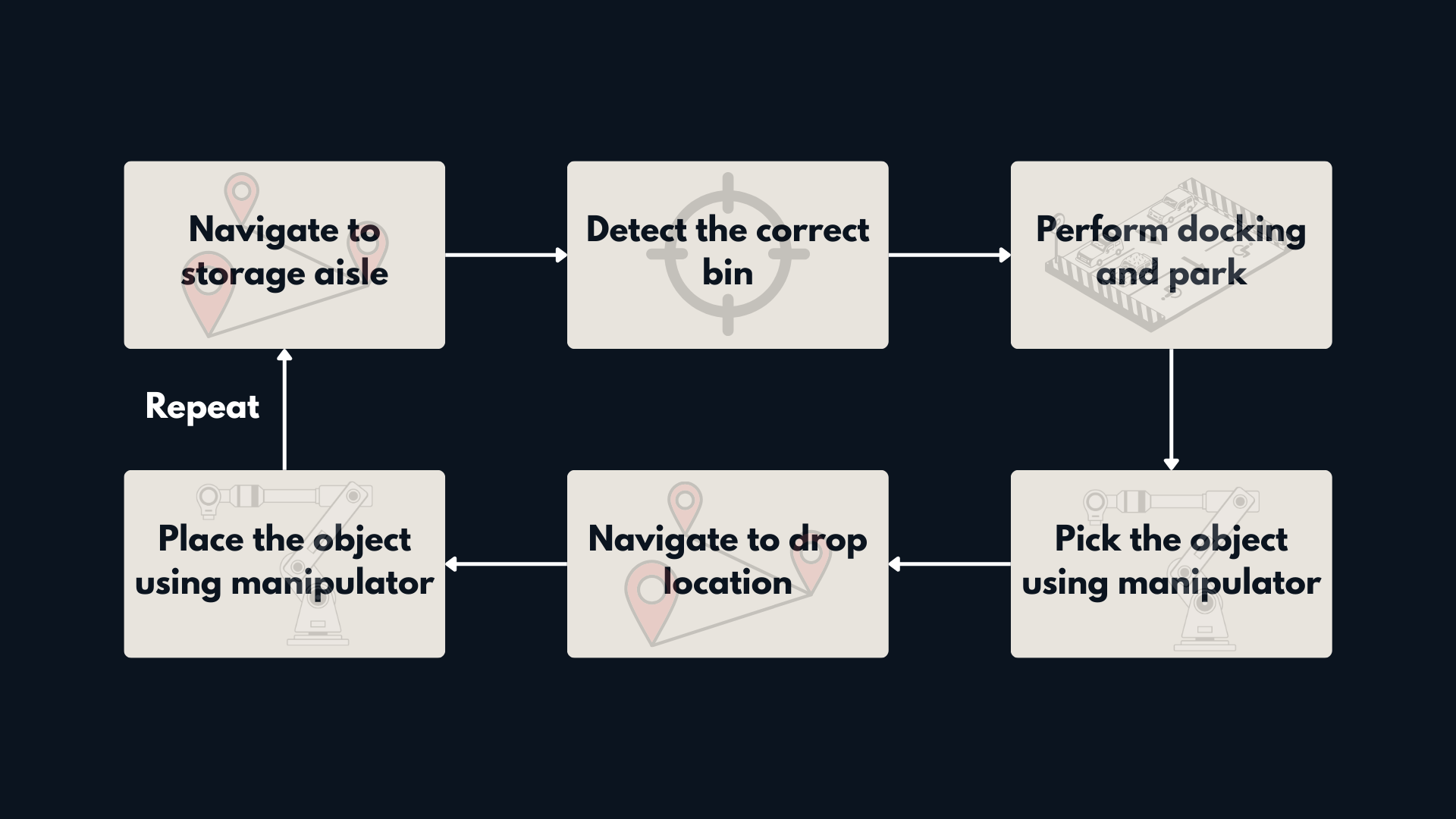 Figure 1: Problem definition for Warehouse Mobile Manipulation Workflow.
- Navigate to a storage aisle
- Identify the correct bin
- Dock precisely in front of it
- Pick the object using a 6-DOF arm
- Deliver it to a drop-off station
- Repeat safely and consistently
To build this reliably, we need structured system design.
Layered System Architecture
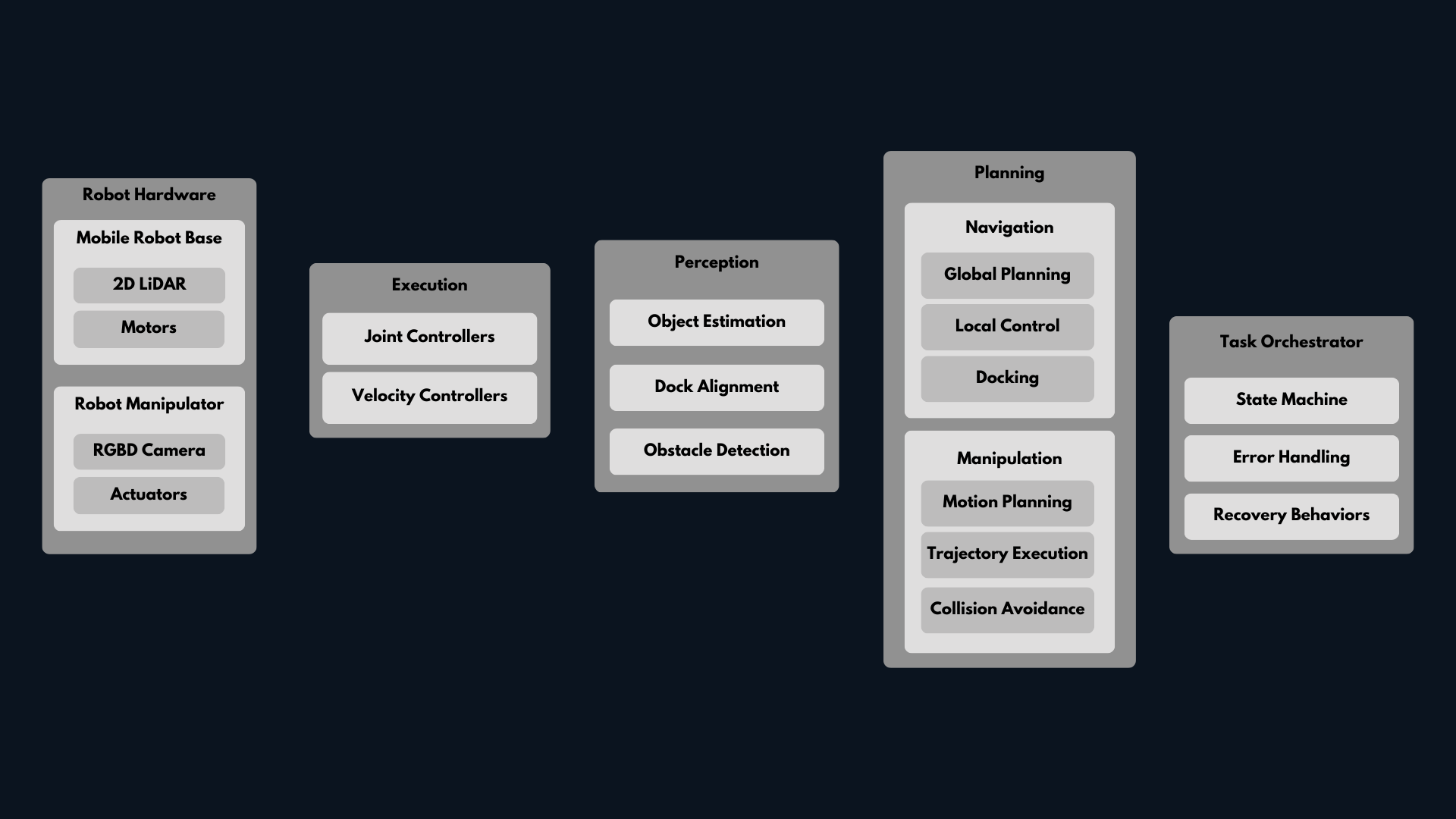 Figure 2: Layered architecture for a scalable AMR + manipulator system.
A scalable mobile manipulation system can be divided into clear layers:
1. Hardware Layer
- Mobile base
- LiDAR and RGB-D camera
- 6-DOF robotic arm
- Gripper
2. Perception Layer
- Object detection
- Dock alignment
- Obstacle detection
3. Planning Layer
Navigation
- Global path planning
- Local obstacle avoidance
- Docking behavior
Manipulation
- Motion planning
- Collision checking
- Trajectory execution
4. Execution Layer
- Joint controllers
- Base velocity controllers
5. Task Orchestration
- State machine or Behavior Tree
- Error handling
- Recovery behaviors
This separation keeps the system modular. Each layer can be developed, tested, and improved independently.
Design Philosophy: Simulation First, Then Integration
Architecture alone is not enough. The development process matters just as much.
At Kodo Robotics, we follow a simple rule:
Simulate first. Integrate gradually. Deploy last.
Simulation First
Before touching hardware, we validate everything in simulation:
- Navigation tuning in warehouse layouts
- Arm motion planning in clutter
- Docking precision
- Sensor behavior under different conditions
Simulation allows fast iteration, safe testing, and reproducible experiments.
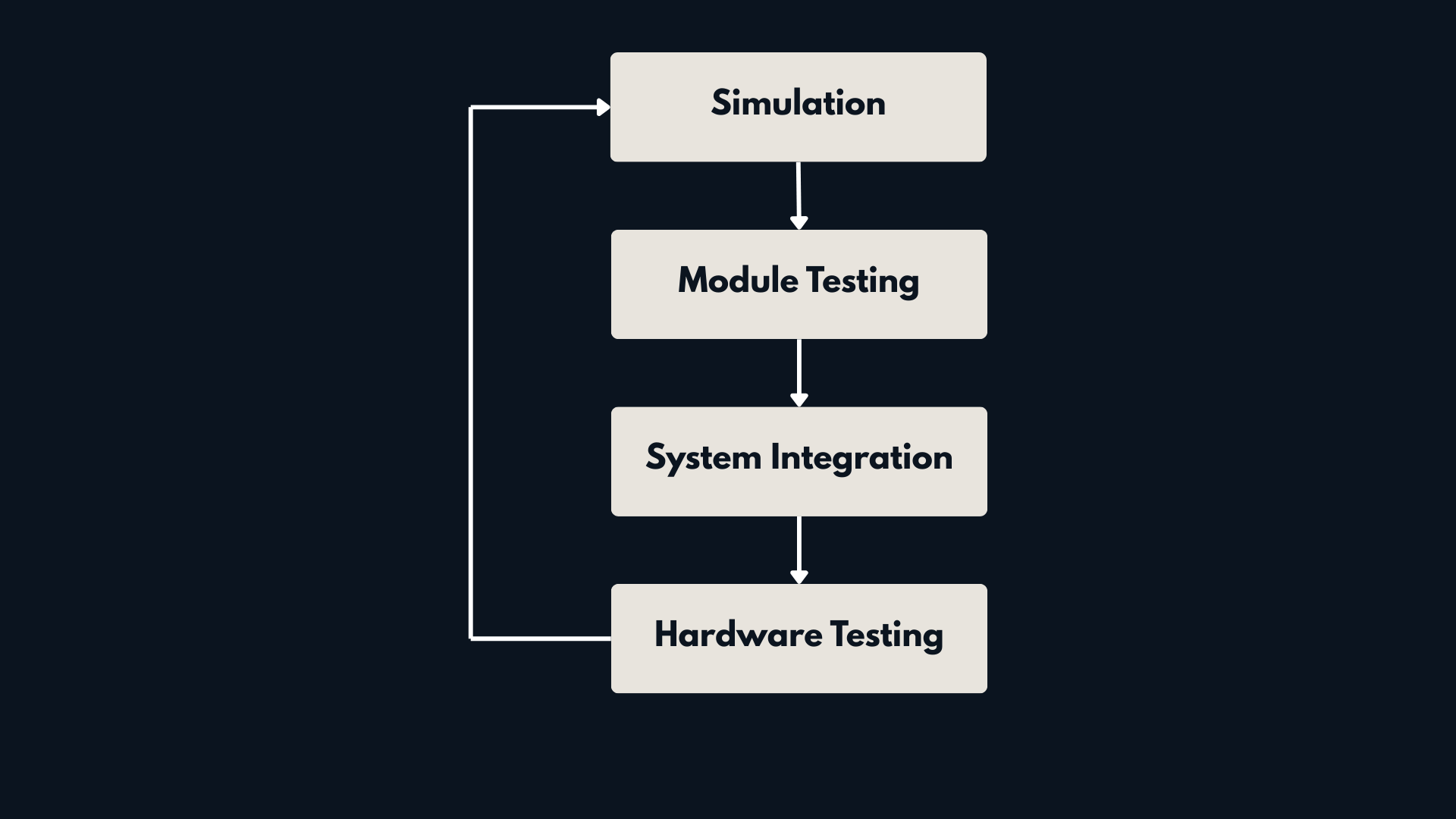 Figure 3: Development Loop for a scalable robotics system.
Test Modules Independently
Each layer is tested separately before full integration:
Navigation
- Path planning stability
- Obstacle avoidance
Manipulation
- IK validation
- Collision-free trajectories
Perception
- Object detection accuracy
- Pose estimation consistency
This prevents integration problems later.
Incremental Integration
Instead of integrating everything at once, we proceed step by step:
- Base + navigation
- Arm motion planning
- Docking integration
- Full pick and place loop
- Fault and recovery testing
Only after simulation and integration tests are stable do we move to hardware validation.
Hardware Testing
Real-world testing focuses on:
- Sensor latency
- Mechanical tolerances
- Calibration drift
- Real-world noise
Simulation builds confidence. Hardware testing validates assumptions.
Framework Comparison by Architecture Layer
Framework selection should support the layered architecture — not fight it.
| Layer | ROS2 Ecosystem | NVIDIA Isaac | MATLAB/Simulink |
|---|---|---|---|
| Navigation | Nav2 | Isaac ROS Navigation | Navigation Toolbox |
| Manipulation | MoveIt2 | Isaac Manipulation | Robotics System Toolbox |
| Simulation | Gazebo | Isaac Sim | Simulink + Unreal |
| Control | ros2_control | GPU nodes | Model-based control |
| Deployment | Linux / RT | GPU platforms | Autocode + ROS integration |
Now let’s look at each layer clearly.
Navigation
For warehouse AMRs, Nav2 is currently the most practical choice.
It provides:
- Mature planners
- Behavior Tree orchestration
- Recovery behaviors
- Costmaps and zoning
- Docking support
It is modular and widely adopted.
Isaac offers acceleration and perception-focused advantages, but Nav2 provides stronger out-of-the-box industrial navigation features.
MATLAB can prototype planners but does not provide a complete industrial navigation stack by default.
Practical choice: Nav2 for most industrial AMR systems.
Manipulation
For arm motion planning, MoveIt2 remains the most flexible and integration-friendly option.
It offers:
- Collision checking
- OMPL-based motion planning
- Inverse kinematics (IK) solvers
- Planning scene management
- Pick-and-place framework with grasp execution support
- Integration with ros2_control for hardware execution
Isaac provides strong GPU-based workflows, especially for perception heavy pipelines.
MATLAB/Simulink is excellent for prototyping kinematics and trajectory logic, but typically integrates with ROS for execution.
Practical choice: MoveIt2 as the backbone, optionally supported by MATLAB for algorithm design.
Simulation
If you follow a simulation-first philosophy, simulator choice matters.
Gazebo
- Fast iteration
- Tight ROS2 integration
- Ideal for functional validation
Isaac Sim
- High visual fidelity
- Advanced sensor realism
- Strong for perception systems
Simulink + Unreal
- Control focused validation
- Physics based modeling
Choose based on what you are validating:
- System logic → Gazebo
- Sensor realism → Isaac
- Control validation → Simulink
Control Design
For many industrial systems, ros2_control is sufficient.
However, when:
- Advanced model-based control is required
- Safety validation is important
- Autocode generation is needed
MATLAB/Simulink provides strong structured workflows.
Isaac mainly accelerates compute-heavy tasks rather than replacing control design frameworks.
Deployment
Deployment depends on system constraints.
ROS2
- Modular
- Linux native
- Hardware abstraction friendly
Isaac
- GPU optimized deployment
MATLAB/Simulink
- Automatic C++ generation
- Clear traceability from design to runtime
For model-based workflows, MATLAB shines during deployment integration.
Recommended Hybrid Approach
A layered architecture allows mixing tools intelligently:
- Navigation → Nav2
- Manipulation → MoveIt2
- Simulation → Gazebo or Isaac Sim
- Control validation → MATLAB/Simulink
- Runtime deployment → ROS2
The goal is not to choose one ecosystem, but to design a clean, modular system.
Conclusion
Building an AMR + Manipulator system is an architecture challenge.
Clear layering, disciplined testing, and simulation-first development are what make systems scalable and reliable.
At Kodo Robotics, we focus on structured system design, because in robotics, integration quality determines success.
Let’s Build Reliable Robotics Systems
If you are designing a warehouse automation system or exploring mobile manipulation for industrial use, architecture decisions made early will define long-term success.
Whether you are prototyping a new platform or scaling an existing deployment, a modular, simulation-first approach reduces risk and accelerates development.
Feel free to connect or reach out if you would like to discuss system architecture, mobile manipulation, or AMR platform design.