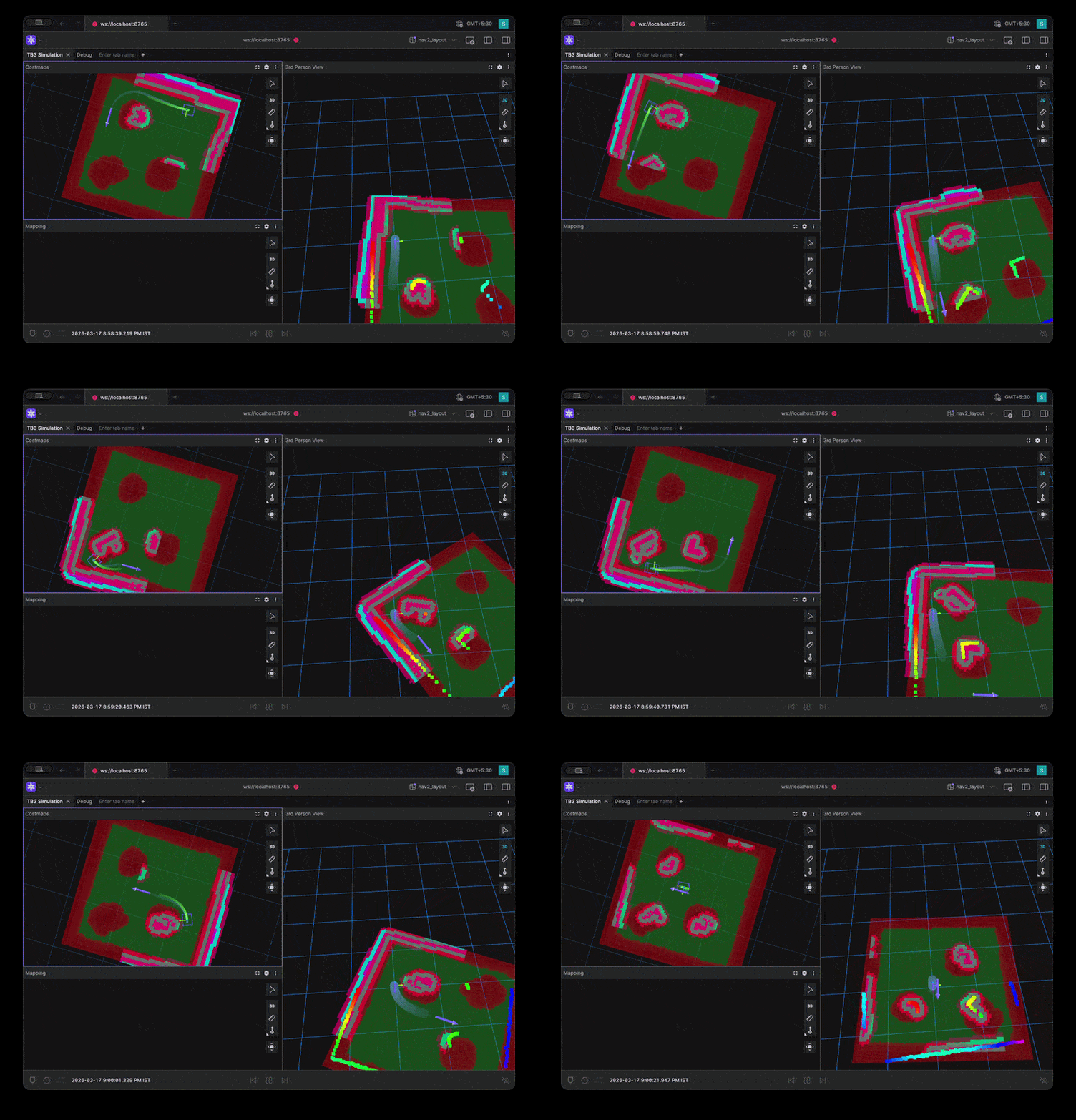
<?xml version="1.0" encoding="utf-8"?><feed xmlns="http://www.w3.org/2005/Atom" ><generator uri="https://jekyllrb.com/" version="3.10.0">Jekyll</generator><link href="https://kodorobotics.com/feed.xml" rel="self" type="application/atom+xml" /><link href="https://kodorobotics.com/" rel="alternate" type="text/html" /><updated>2026-04-03T16:13:42+00:00</updated><id>https://kodorobotics.com/feed.xml</id><title type="html">Kodo Robotics</title><subtitle>コード・ロボティクス — Code for the future of robotics</subtitle><author><name>Kodo Robotics</name></author><entry><title type="html">Behavior Trees vs State Machines in Robotics: Lessons from Real Robot Workflows</title><link href="https://kodorobotics.com/behavior-trees-vs-state-machines/" rel="alternate" type="text/html" title="Behavior Trees vs State Machines in Robotics: Lessons from Real Robot Workflows" /><published>2026-03-29T00:00:00+00:00</published><updated>2026-03-29T00:00:00+00:00</updated><id>https://kodorobotics.com/behavior-trees-vs-state-machines</id><content type="html" xml:base="https://kodorobotics.com/behavior-trees-vs-state-machines/"><![CDATA[<h2 id="introduction">Introduction</h2>

<p>One of the recurring architectural decisions in robotics projects is how to organize task execution.</p>

<p>In practice, this decision becomes important very quickly. A robot rarely performs only one action. It needs to move, detect, decide, recover from failures, and sometimes interrupt one task to handle a higher-priority event.</p>

<p>Two common ways to model this logic are:</p>

<ul>
  <li><strong>State Machines</strong></li>
  <li><strong>Behavior Trees</strong></li>
</ul>

<p>Both are useful, but they are not equally suitable for every robotics problem.</p>

<p>A common mistake is to treat them as interchangeable. From project work, we have found that they solve different orchestration problems and lead to very different system complexity as a project grows.</p>

<p>This article is meant to be a practical guide based on the kind of robotics workflows where this decision actually matters.</p>

<p>The comparison here comes from two representative examples:</p>

<ul>
  <li>An <strong>agriculture workflow</strong> with <code class="language-plaintext highlighter-rouge">move -&gt; detect -&gt; pick -&gt; place</code></li>
  <li>A <strong>patrol robot workflow</strong> with patrolling, intruder handling, docking, and recovery</li>
</ul>

<p>The main takeaway is simple:</p>

<blockquote>
  <p>A State Machine works very well when the task is mostly linear and mode-based.<br />
A Behavior Tree becomes more useful when the robot must react, recover, reprioritize, and combine multiple decision layers at runtime.</p>
</blockquote>

<h2 id="behavior-trees-vs-state-machines-quick-comparison">Behavior Trees vs State Machines: Quick Comparison</h2>

<table>
  <thead>
    <tr>
      <th>Aspect</th>
      <th>State Machine</th>
      <th>Behavior Tree</th>
    </tr>
  </thead>
  <tbody>
    <tr>
      <td>Best fit</td>
      <td>Sequential workflows</td>
      <td>Reactive decision-making</td>
    </tr>
    <tr>
      <td>Main question</td>
      <td>What step am I in?</td>
      <td>What should I do now?</td>
    </tr>
    <tr>
      <td>Strength</td>
      <td>Clarity and explicit flow</td>
      <td>Priority handling and modular recovery</td>
    </tr>
    <tr>
      <td>Weakness</td>
      <td>Transition explosion in complex systems</td>
      <td>More abstraction for simple tasks</td>
    </tr>
    <tr>
      <td>Good example</td>
      <td>Agriculture pick and place</td>
      <td>Patrol, docking, and intruder response</td>
    </tr>
  </tbody>
</table>

<h2 id="state-machines-in-robotics">State Machines in Robotics</h2>

<p>A State Machine models a system as:</p>

<ul>
  <li>A set of <strong>states</strong></li>
  <li>A set of <strong>transitions</strong></li>
  <li>Conditions that determine when the system moves from one state to another</li>
</ul>

<p>A simplified example looks like:</p>

<div class="language-text highlighter-rouge"><div class="highlight"><pre class="highlight"><code>Idle -&gt; MoveToTarget -&gt; DetectObject -&gt; PickObject -&gt; PlaceObject -&gt; Done
</code></pre></div></div>

<p>At any moment, the robot is usually in one well-defined state, and the logic is expressed as transitions between these states.</p>

<p>In robotics projects, this makes State Machines intuitive and easy to debug for workflows that follow a predictable sequence.</p>

<h3 id="why-they-work-well-in-practice">Why They Work Well in Practice</h3>

<p>State Machines are easy to reason about because they match how humans often describe tasks:</p>

<ol>
  <li>Go to location</li>
  <li>Detect object</li>
  <li>Pick object</li>
  <li>Place object</li>
  <li>Return or stop</li>
</ol>

<p>For many real systems, this is enough.</p>

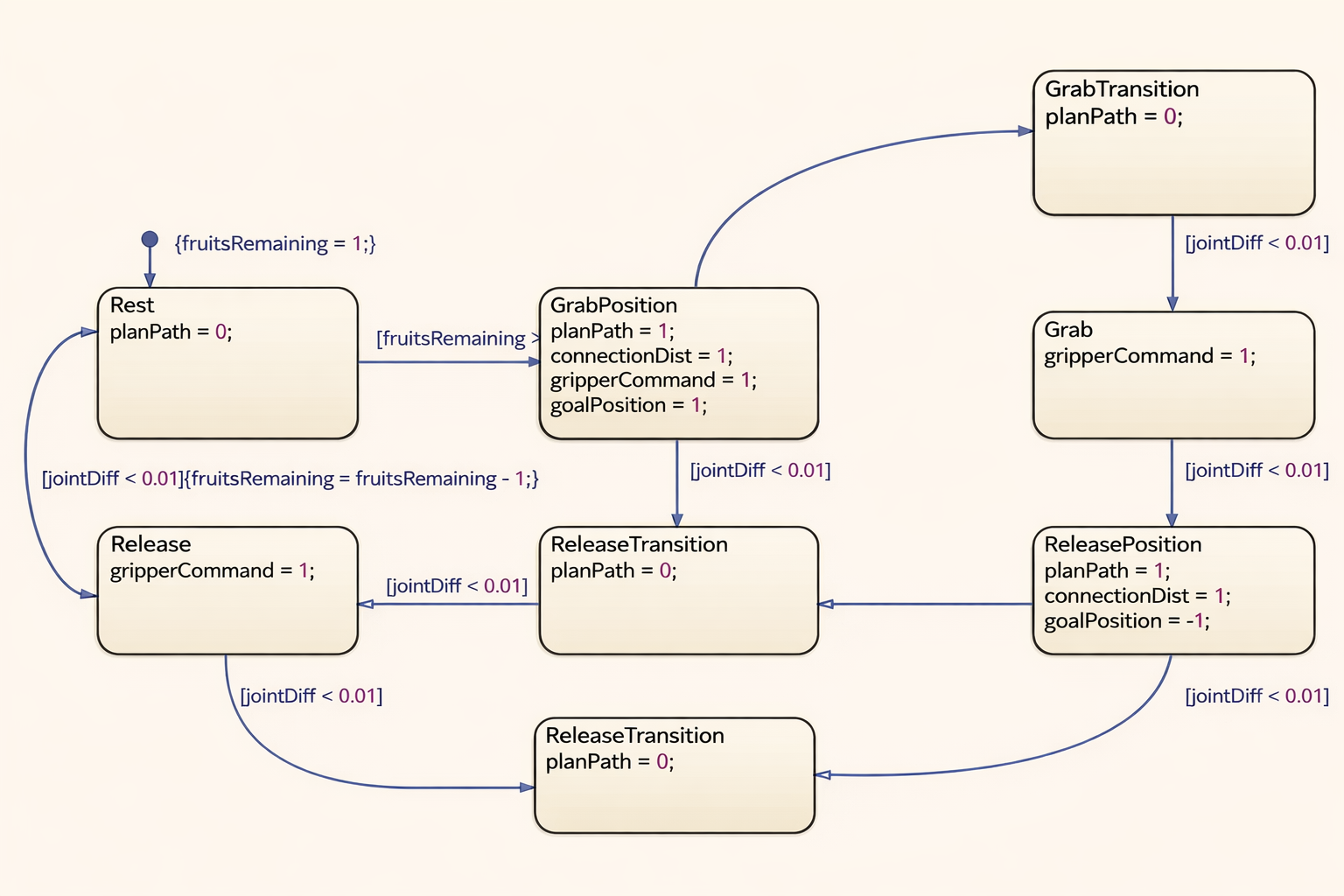
<p><img src="/assets/images/posts/behavior-trees-vs-state-machines/state-machine-workflow.png" alt="State Machine Workflow Diagram" />
<em>Figure 1: State Machine view of a structured robotics workflow.</em></p>

<h2 id="where-state-machines-worked-well-agriculture-pick-and-place">Where State Machines Worked Well: Agriculture Pick and Place</h2>

<p>Consider an agricultural robot working in a structured environment such as a greenhouse or a controlled farm row.</p>

<p>At first glance, <code class="language-plaintext highlighter-rouge">move -&gt; detect -&gt; pick -&gt; place</code> sounds too simple, and that can make the conclusion feel too easy. In practice, the real workflow is usually more involved than that.</p>

<p>A more realistic agricultural cycle may include:</p>

<ol>
  <li>Move to the next plant</li>
  <li>Slow down and switch to scanning mode</li>
  <li>Detect fruit or crop candidates</li>
  <li>Filter candidates by ripeness, reachability, or confidence</li>
  <li>Align the mobile base or manipulator</li>
  <li>Execute the pick</li>
  <li>Verify grasp success</li>
  <li>Place the crop in a collection bin</li>
  <li>Update yield count or row progress</li>
  <li>Move to the next target</li>
</ol>

<p>This is a strong State Machine use case, and in our experience it is exactly the kind of workflow where a State Machine stays clear and manageable.</p>

<h3 id="why-it-fit-well">Why It Fit Well</h3>

<p>Even with added perception and verification steps, the task is still mostly sequential.</p>

<p>Each stage has a clear objective:</p>

<ul>
  <li>Navigation gets the robot into position</li>
  <li>Scanning and detection identify candidate fruit</li>
  <li>Selection logic chooses the best target</li>
  <li>Manipulation aligns and executes the pick</li>
  <li>Verification confirms whether the grasp succeeded</li>
  <li>Placement completes the harvest cycle</li>
</ul>

<p>There may be retries, skips, and small local recoveries, but the overall structure is still linear and mode-based.</p>

<p>A simplified state model could be:</p>

<div class="language-text highlighter-rouge"><div class="highlight"><pre class="highlight"><code>Idle
  -&gt; NavigateToPlant
  -&gt; ScanCropRegion
  -&gt; DetectCandidateCrops
  -&gt; SelectTargetCrop
  -&gt; AlignManipulator
  -&gt; PickCrop
  -&gt; VerifyGrasp
  -&gt; PlaceInCrate
  -&gt; UpdateTaskProgress
  -&gt; AdvanceToNextPlant
  -&gt; ScanCropRegion ...
</code></pre></div></div>

<p>If something goes wrong, the recovery logic can still remain local to the active step. For example:</p>

<ul>
  <li>If no crop is detected, retry scanning once or move to the next plant</li>
  <li>If crop confidence is low, rescan from a slightly different pose</li>
  <li>If the pick fails, retry the grasp with another candidate</li>
  <li>If the bin is full, transition to an unload or crate-swap routine</li>
  <li>If manipulation repeatedly fails, flag the plant and continue</li>
</ul>

<p>Those are real operational branches, but they still fit naturally into a State Machine because they usually remain tied to one phase of the process rather than globally reprioritizing the whole robot.</p>

<h3 id="what-we-learned-from-this-type-of-workflow">What We Learned from This Type of Workflow</h3>

<p>In agriculture pick-and-place, the robot usually does not need deep concurrent reasoning across many competing goals.</p>

<p>It is typically operating in a bounded loop:</p>

<ul>
  <li>finish the current step</li>
  <li>move to the next step</li>
  <li>recover locally if needed</li>
</ul>

<p>That makes the software easier to implement, test, and explain across the team.</p>

<p>The important point is not that the agriculture problem is trivial. It often is not. The point is that the complexity is still usually organized around process stages rather than competing runtime priorities.</p>

<p>That is why a State Machine can still work well even when the workflow includes:</p>

<ul>
  <li>target quality checks</li>
  <li>grasp verification</li>
  <li>localized retries</li>
  <li>bin management</li>
  <li>row-by-row progress tracking</li>
</ul>

<h3 id="practical-benefits">Practical Benefits</h3>

<ul>
  <li>The flow is explicit and easy to visualize</li>
  <li>Failures are usually local to a step</li>
  <li>Operators can understand the workflow quickly</li>
  <li>Debugging is straightforward because the current state is usually obvious</li>
</ul>

<h3 id="where-it-starts-to-strain">Where It Starts to Strain</h3>

<p>Even in agriculture, State Machines become harder to manage if we keep adding:</p>

<ul>
  <li>battery-aware behavior</li>
  <li>human-aware pausing in shared spaces</li>
  <li>dynamic obstacle handling</li>
  <li>multiple interrupt levels</li>
  <li>task preemption</li>
  <li>alternative recovery paths</li>
  <li>mission-level decisions such as switching rows or unloading based on fleet context</li>
</ul>

<p>At that point, the transition graph can grow rapidly.</p>

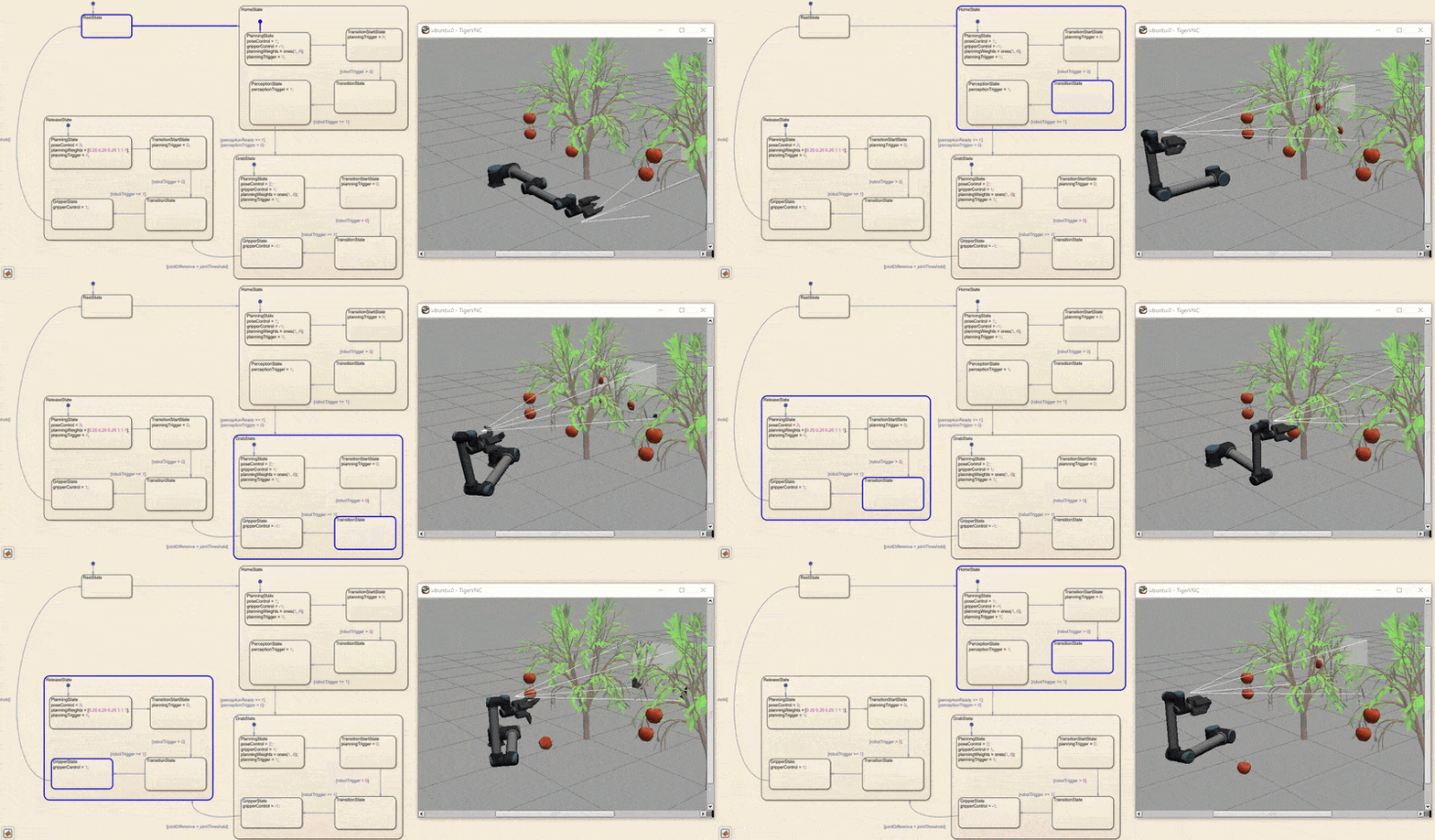
<p><img src="/assets/images/posts/behavior-trees-vs-state-machines/agriculture-state-machine.gif" alt="Agriculture Harvest Workflow" />
<em>Figure 2: Agriculture harvesting workflow with stage-based execution.</em></p>

<h2 id="behavior-trees-in-robotics">Behavior Trees in Robotics</h2>

<p>A Behavior Tree organizes decision-making as a hierarchy of nodes rather than a flat graph of states.</p>

<p>Instead of building one large transition graph, a Behavior Tree breaks the robot’s behavior into smaller decision blocks that can be composed together. This makes it possible to express not only task flow, but also priority, fallback, retry, and interruption in a more structured way.</p>

<p>Typical node types include:</p>

<ul>
  <li><strong>Sequence</strong>: run children in order until one fails</li>
  <li><strong>Fallback / Selector</strong>: try alternatives until one succeeds</li>
  <li><strong>Condition</strong>: check if something is true</li>
  <li><strong>Action</strong>: perform a task</li>
  <li><strong>Decorator</strong>: modify behavior such as retrying or limiting execution</li>
</ul>

<p>A Behavior Tree is evaluated repeatedly, which makes it naturally suited for reactive systems.</p>

<p>That repeated evaluation, often called <strong>ticking</strong>, is one of the most important practical differences from a State Machine. The tree is not simply waiting in one state for a transition. It keeps re-evaluating the current situation and asking which branch should be active now.</p>

<p>This is what makes Behavior Trees useful in robotics systems where conditions can change while the robot is already in motion. A battery condition can become true mid-task. An intruder can appear while the robot is patrolling. A navigation action can fail and trigger a local recovery branch without needing to redesign the whole mission graph.</p>

<p>Another practical strength is locality. A recovery subtree can live close to the action it supports. A retry policy can wrap only the branch that needs it. A high-priority condition such as low battery can sit near the top of the tree and override lower-priority behavior cleanly.</p>

<p>A simplified view might look like:</p>

<div class="language-text highlighter-rouge"><div class="highlight"><pre class="highlight"><code>Fallback
  BatteryLow? -&gt; Dock
  IntruderDetected? -&gt; Intercept
  PatrolRoute
</code></pre></div></div>

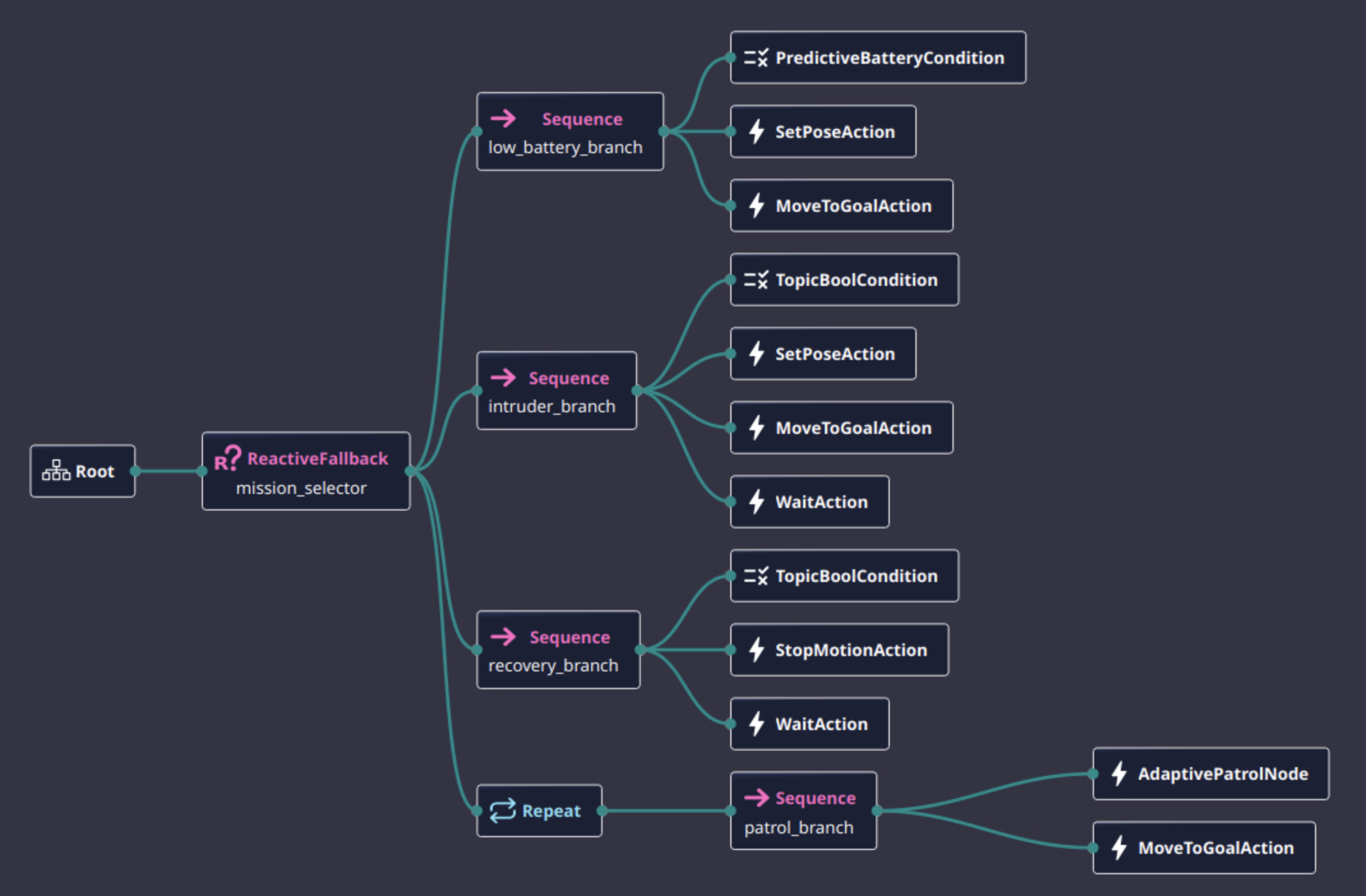
<p><img src="/assets/images/posts/behavior-trees-vs-state-machines/behavior-tree-overview.png" alt="Behavior Tree Structure Overview" />
<em>Figure 3: Behavior Tree showing priority-based decision structure.</em></p>

<p>This structure is different from a State Machine in an important way:</p>

<blockquote>
  <p>A Behavior Tree is not only describing “what state am I in?”<br />
It is also continuously describing “what should I do right now, given current conditions?”</p>
</blockquote>

<h2 id="where-behavior-trees-became-necessary-patrol-robot">Where Behavior Trees Became Necessary: Patrol Robot</h2>

<p>Now consider a patrol robot in a larger, less predictable environment.</p>

<p>Its responsibilities may include:</p>

<ul>
  <li>Follow a patrol route</li>
  <li>Monitor for intruders</li>
  <li>Interrupt patrol when an intruder is detected</li>
  <li>Move to investigate or intercept</li>
  <li>Resume patrol if the event clears</li>
  <li>Dock when the battery is low</li>
  <li>Recover from blocked paths or navigation failures</li>
</ul>

<p>This is where Behavior Trees become much more useful, and in practice this is the kind of system where they stop being a preference and start becoming the better architectural tool.</p>

<h3 id="why-patrol-was-different">Why Patrol Was Different</h3>

<p>Patrol is not a simple linear workflow.</p>

<p>The robot must continuously balance priorities:</p>

<ul>
  <li>patrolling is the default task</li>
  <li>intruder response may preempt patrolling</li>
  <li>docking may preempt both when battery becomes critical</li>
  <li>recovery behaviors may temporarily override any of the above</li>
</ul>

<p>Trying to model all of this in one large State Machine often leads to too many transitions:</p>

<ul>
  <li>Patrol -&gt; IntruderDetected</li>
  <li>IntruderDetected -&gt; Intercept</li>
  <li>Intercept -&gt; Patrol</li>
  <li>Patrol -&gt; Dock</li>
  <li>Intercept -&gt; Dock</li>
  <li>Recovery -&gt; Patrol</li>
  <li>Recovery -&gt; Dock</li>
  <li>Recovery -&gt; Intercept</li>
</ul>

<p>As conditions increase, the state graph becomes harder to maintain and reason about. That is usually the point where a team starts feeling the limits of a State Machine.</p>

<h3 id="a-better-fit-with-behavior-trees">A Better Fit with Behavior Trees</h3>

<p>A Behavior Tree can model the same logic more naturally:</p>

<div class="language-text highlighter-rouge"><div class="highlight"><pre class="highlight"><code>Fallback
  Sequence
    BatteryLow?
    Dock

  Sequence
    IntruderDetected?
    InvestigateOrIntercept

  Sequence
    PatrolRouteAvailable?
    PatrolRoute
</code></pre></div></div>

<p>Recovery can also be attached locally:</p>

<div class="language-text highlighter-rouge"><div class="highlight"><pre class="highlight"><code>Sequence
  PatrolRouteAvailable?
  RetryUntilSuccessful
    PatrolRoute
</code></pre></div></div>

<p>This structure makes it easier to express priority and fallback behavior.</p>

<h3 id="what-we-learned-from-this-type-of-workflow-1">What We Learned from This Type of Workflow</h3>

<p>In patrol robots, the environment and task priorities can change at runtime.</p>

<p>The robot may be:</p>

<ul>
  <li>following a patrol loop</li>
  <li>interrupted by a perception event</li>
  <li>forced to reroute due to a blocked corridor</li>
  <li>required to dock before finishing the route</li>
</ul>

<p>Behavior Trees handle this well because they are built for:</p>

<ul>
  <li>reactivity</li>
  <li>prioritization</li>
  <li>modular decision logic</li>
  <li>reusable sub-behaviors</li>
</ul>

<p>In systems like Nav2, this is one reason Behavior Trees are such a practical fit. Navigation is not a one-shot action. The robot may need to replan, retry, wait, recover, or switch goals based on runtime conditions, and a tree structure handles that more naturally than a large set of cross-linked states.</p>

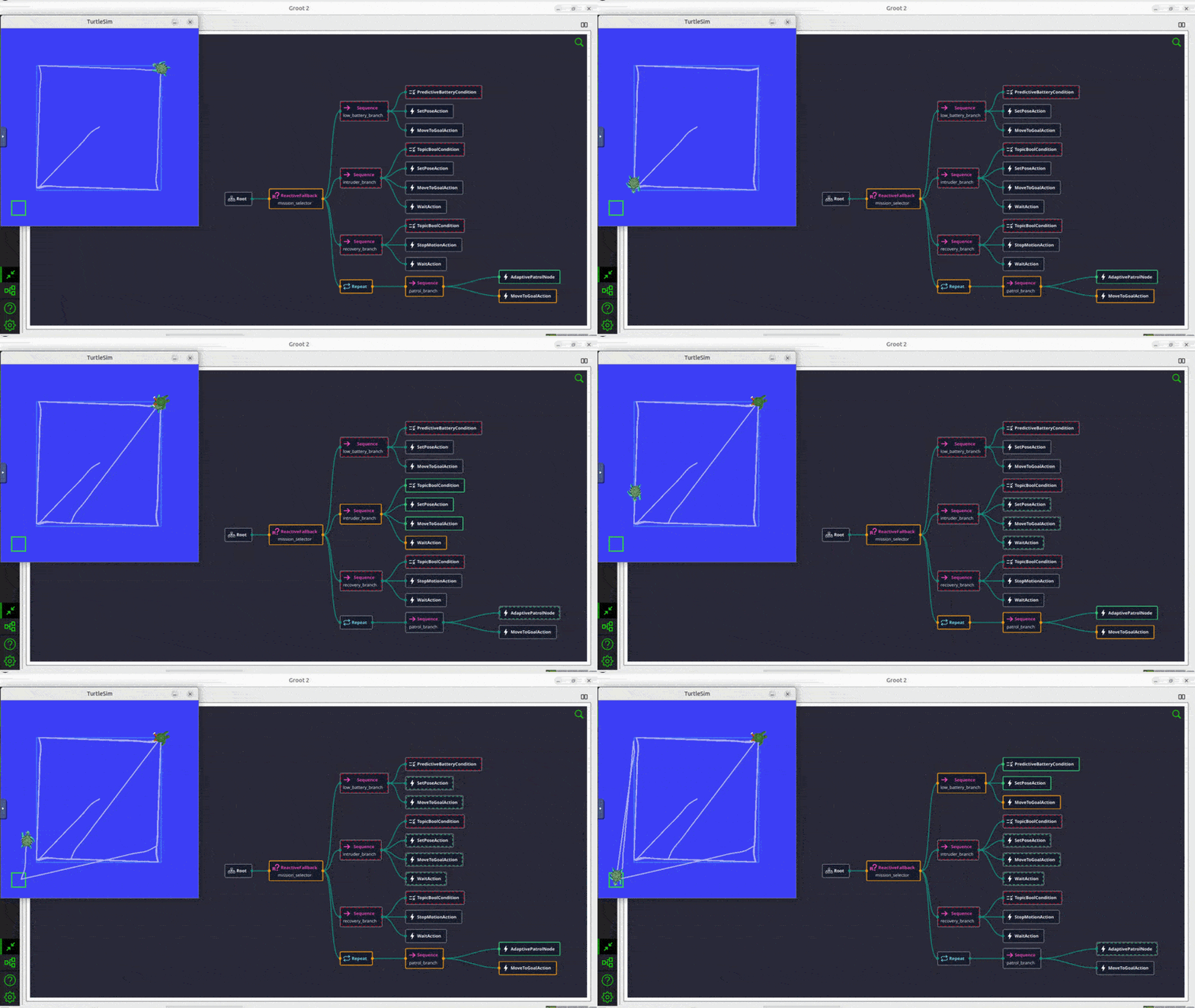
<p><img src="/assets/images/posts/behavior-trees-vs-state-machines/patrol-behavior-tree.gif" alt="Patrol Robot Behavior Tree" />
<em>Figure 4: Patrol robot behavior tree with patrol, intruder handling, docking, and recovery branches.</em></p>

<h2 id="the-practical-difference-sequence-vs-reactivity">The Practical Difference: Sequence vs Reactivity</h2>

<p>The easiest way to distinguish the two is this:</p>

<h3 id="state-machine">State Machine</h3>

<p>Best when the main question is:</p>

<blockquote>
  <p>What step of the process am I in?</p>
</blockquote>

<h3 id="behavior-tree">Behavior Tree</h3>

<p>Best when the main question is:</p>

<blockquote>
  <p>Given the current world state, what behavior should run now?</p>
</blockquote>

<p>This is why State Machines often feel natural for production steps, while Behavior Trees feel natural for autonomous runtime decision-making.</p>

<h2 id="state-machines-practical-strengths-and-limits">State Machines: Practical Strengths and Limits</h2>

<h3 id="advantages">Advantages</h3>

<ul>
  <li>Simple to understand for linear workflows</li>
  <li>Easy to implement for finite process steps</li>
  <li>Explicit transitions make debugging easier</li>
  <li>Good fit for task pipelines with limited branching</li>
</ul>

<h3 id="where-the-advantage-was-clear">Where the Advantage Was Clear</h3>

<p>In the agriculture workflow, each step depends on successful completion of the previous step:</p>

<ul>
  <li>no point in picking before detection</li>
  <li>no point in placing before picking</li>
  <li>no point in advancing before the current cycle is finished</li>
</ul>

<p>That dependency chain maps directly to states.</p>

<h3 id="limitations">Limitations</h3>

<ul>
  <li>Transition graphs grow quickly as exceptions increase</li>
  <li>Harder to model layered priorities</li>
  <li>Reactivity becomes messy when many interrupts exist</li>
  <li>Reuse across tasks is often weaker than in tree-based designs</li>
</ul>

<h3 id="where-the-limitation-starts-to-appear">Where the Limitation Starts to Appear</h3>

<p>Suppose the agriculture robot must now also:</p>

<ul>
  <li>monitor battery</li>
  <li>pause for human presence</li>
  <li>re-scan if crop confidence drops</li>
  <li>retry grasp using alternative poses</li>
  <li>switch to a different collection bin when full</li>
</ul>

<p>A once-clean State Machine can become crowded with cross-links and exception handling. That does not make it wrong, but it does mean the orchestration model is being asked to handle more reactivity than it was originally optimized for.</p>

<h2 id="behavior-trees-practical-strengths-and-limits">Behavior Trees: Practical Strengths and Limits</h2>

<h3 id="advantages-1">Advantages</h3>

<ul>
  <li>Naturally reactive to changing conditions</li>
  <li>Easier to express priorities and fallbacks</li>
  <li>Modular subtrees are reusable</li>
  <li>Recovery behaviors can be attached cleanly</li>
  <li>Scales better when many conditions interact</li>
</ul>

<h3 id="where-the-advantage-was-clear-1">Where the Advantage Was Clear</h3>

<p>In the patrol robot:</p>

<ul>
  <li>patrol is the default behavior</li>
  <li>intruder handling is conditional and higher priority</li>
  <li>docking is conditional and may override patrol</li>
  <li>recovery should be local to the failing branch</li>
</ul>

<p>This is exactly the kind of layered runtime behavior that Behavior Trees express well.</p>

<h3 id="limitations-1">Limitations</h3>

<ul>
  <li>Harder to understand initially if the team is new to them</li>
  <li>Poorly designed trees can become opaque</li>
  <li>Continuous ticking can make debugging feel less direct than a single active state</li>
  <li>For simple linear tasks, a Behavior Tree can be unnecessary overhead</li>
</ul>

<h3 id="where-the-limitation-appears">Where the Limitation Appears</h3>

<p>If the agriculture task is almost always:</p>

<div class="language-text highlighter-rouge"><div class="highlight"><pre class="highlight"><code>Move -&gt; Detect -&gt; Pick -&gt; Place
</code></pre></div></div>

<p>then implementing a full Behavior Tree may add complexity without much benefit.</p>

<p>In such a case, the architecture is technically valid, but not necessarily the simplest solution.</p>

<h2 id="when-we-would-choose-a-state-machine">When We Would Choose a State Machine</h2>

<p>A State Machine is usually the better choice when:</p>

<ul>
  <li>the workflow is mostly sequential</li>
  <li>the number of branches is limited</li>
  <li>system modes are well defined</li>
  <li>operators need very explicit process visibility</li>
  <li>task completion matters more than continuous reprioritization</li>
</ul>

<p>Typical examples include:</p>

<ul>
  <li>pick-and-place sequences</li>
  <li>machine operation cycles</li>
  <li>startup and shutdown procedures</li>
  <li>inspection routines with fixed steps</li>
</ul>

<h3 id="rule-of-thumb">Rule of Thumb</h3>

<p>If you can describe the robot’s job mainly as:</p>

<div class="language-text highlighter-rouge"><div class="highlight"><pre class="highlight"><code>Step 1 -&gt; Step 2 -&gt; Step 3
</code></pre></div></div>

<p>then a State Machine is often enough.</p>

<h2 id="when-we-would-choose-a-behavior-tree">When We Would Choose a Behavior Tree</h2>

<p>A Behavior Tree is usually the better choice when:</p>

<ul>
  <li>the robot must react continuously to the environment</li>
  <li>multiple conditions compete for attention</li>
  <li>priorities can change at runtime</li>
  <li>recoveries need to be modular</li>
  <li>behaviors should be reusable across missions</li>
</ul>

<p>Typical examples include:</p>

<ul>
  <li>patrol robots</li>
  <li>service robots</li>
  <li>navigation with recovery branches</li>
  <li>mission planners with interrupts and fallback policies</li>
</ul>

<h3 id="rule-of-thumb-1">Rule of Thumb</h3>

<p>If you can describe the robot’s job mainly as:</p>

<div class="language-text highlighter-rouge"><div class="highlight"><pre class="highlight"><code>Keep doing the best possible behavior based on current conditions
</code></pre></div></div>

<p>then a Behavior Tree is likely the better fit.</p>

<h2 id="agriculture-vs-patrol-what-the-choice-looked-like-in-practice">Agriculture vs Patrol: What the Choice Looked Like in Practice</h2>

<p>These two examples capture the difference well.</p>

<h3 id="agriculture">Agriculture</h3>

<p>For <code class="language-plaintext highlighter-rouge">move -&gt; detect -&gt; pick -&gt; place</code>, a State Machine works well because:</p>

<ul>
  <li>the task is strongly ordered</li>
  <li>the workflow is repetitive</li>
  <li>transitions are predictable</li>
  <li>failures can be handled step by step</li>
</ul>

<h3 id="patrol">Patrol</h3>

<p>For <code class="language-plaintext highlighter-rouge">move -&gt; intruder response -&gt; docking -&gt; recovery</code>, a Behavior Tree works better because:</p>

<ul>
  <li>the robot must keep reevaluating priorities</li>
  <li>behaviors may interrupt one another</li>
  <li>recovery should be local and reusable</li>
  <li>the environment is more dynamic and less structured</li>
</ul>

<p>This is not because Behavior Trees are always more advanced. It is because the patrol problem is fundamentally more reactive.</p>

<h2 id="conclusion">Conclusion</h2>

<p>The main lesson from these workflows is not that one model is modern and the other is outdated. It is that they fit different kinds of problems.</p>

<p>State Machines remain a strong architectural choice when the robot is progressing through a structured process with clear stages, local failures, and limited global reprioritization. That is why they can still work well even in fairly capable agriculture systems.</p>

<p>Behavior Trees become more valuable when the robot must continuously evaluate conditions, switch priorities, and attach recovery behavior close to the action that failed. That is why they fit patrol, navigation, docking, and other runtime-reactive autonomy problems so well.</p>

<p>In practice, the most useful question is usually not “Which one is better?” It is “Is this robot mainly progressing through stages, or is it continuously selecting among competing behaviors?”</p>

<p>That distinction tends to make the right choice much clearer.</p>]]></content><author><name>Sakshay Mahna</name></author><category term="Robotics" /><category term="System Architecture" /><category term="Autonomy" /><category term="ROS2" /><category term="Behavior Trees" /><category term="State Machines" /><category term="Finite State Machine" /><category term="Robotics Software" /><category term="Task Planning" /><category term="Autonomy" /><category term="Autonomous Robots" /><category term="Patrol Robot" /><category term="Agriculture Robot" /><summary type="html"><![CDATA[A practical guide based on real robotics workflows, comparing Behavior Trees and State Machines through agriculture and patrol examples, with lessons on where each approach works best.]]></summary></entry><entry><title type="html">Just Another Automation Tool for Nav2? Not Really.</title><link href="https://kodorobotics.com/nav2-tuning-systems-approach/" rel="alternate" type="text/html" title="Just Another Automation Tool for Nav2? Not Really." /><published>2026-03-17T00:00:00+00:00</published><updated>2026-03-17T00:00:00+00:00</updated><id>https://kodorobotics.com/nav2-tuning-discussion</id><content type="html" xml:base="https://kodorobotics.com/nav2-tuning-systems-approach/"><![CDATA[<h2 id="introduction">Introduction</h2>

<p>Tuning navigation in ROS2 Nav2 can quickly become a frustrating process.</p>

<p>For Ackermann-drive robots using planners like Hybrid A* or controllers like MPPI, even small parameter changes can lead to unexpected behavior.</p>

<p>A typical workflow looks like:</p>

<ul>
  <li>Modify parameters in YAML</li>
  <li>Launch navigation</li>
  <li>Observe behavior in simulation</li>
  <li>Repeat</li>
</ul>

<p>With dozens of parameters across planners, controllers, and costmaps, this process becomes slow, manual, and difficult to scale.</p>

<p>A natural question arises:</p>

<blockquote>
  <p>Can we automate Nav2 tuning?</p>
</blockquote>

<p>At first glance, tools like Optuna, Bayesian optimization, or even agent-based workflows workflows seem promising. However, in practice:</p>

<blockquote>
  <p><strong>Automation alone does not solve Nav2 tuning.</strong></p>
</blockquote>

<p>This article presents a different perspective:<br />
Nav2 tuning is fundamentally a <strong>systems engineering problem</strong>, not just a parameter optimization problem.</p>

<h2 id="the-problem-with-nav2-parameter-tuning">The Problem with Nav2 Parameter Tuning</h2>

<p>Nav2 exposes a large number of parameters across:</p>

<ul>
  <li>Global planner (<strong>Hybrid A*</strong>, <strong>State Lattice</strong>)</li>
  <li>Controller (<strong>MPPI</strong>, <strong>DWB</strong>)</li>
  <li>Costmaps</li>
  <li>Robot model and kinematics</li>
</ul>

<p>These parameters are tightly coupled. A change in one component often affects others.</p>

<p>The common “edit-run-observe” loop:</p>
<div class="language-plaintext highlighter-rouge"><div class="highlight"><pre class="highlight"><code>Edit YAML → Run → Observe → Repeat
</code></pre></div></div>
<p>has several limitations:</p>

<ul>
  <li>No reproducibility across experiments</li>
  <li>No quantitative comparison between configurations</li>
  <li>Strong dependence on visual inspection</li>
  <li>Poor scalability across different scenarios</li>
</ul>

<p>As highlighted in Nav2 community discussions (notably by maintainers), manual tuning becomes increasingly difficult as system complexity grows.</p>

<h2 id="a-systems-perspective-on-nav2">A Systems Perspective on Nav2</h2>

<p>Instead of treating tuning as a search problem, it is more useful to view Nav2 as a <strong>multi-layer system</strong>:</p>

<ul>
  <li>Robot model defines what is physically possible</li>
  <li>Costmaps define how the environment is interpreted</li>
  <li>Planner defines feasible paths</li>
  <li>Controller defines how those paths are executed</li>
</ul>

<blockquote>
  <p>Poor navigation behavior is often a result of incorrect assumptions in one of these layers, not just “bad parameters”.</p>
</blockquote>

<h2 id="parameter-classification-for-nav2">Parameter Classification for Nav2</h2>

<p>A practical way to simplify tuning is to categorize parameters into three types.</p>

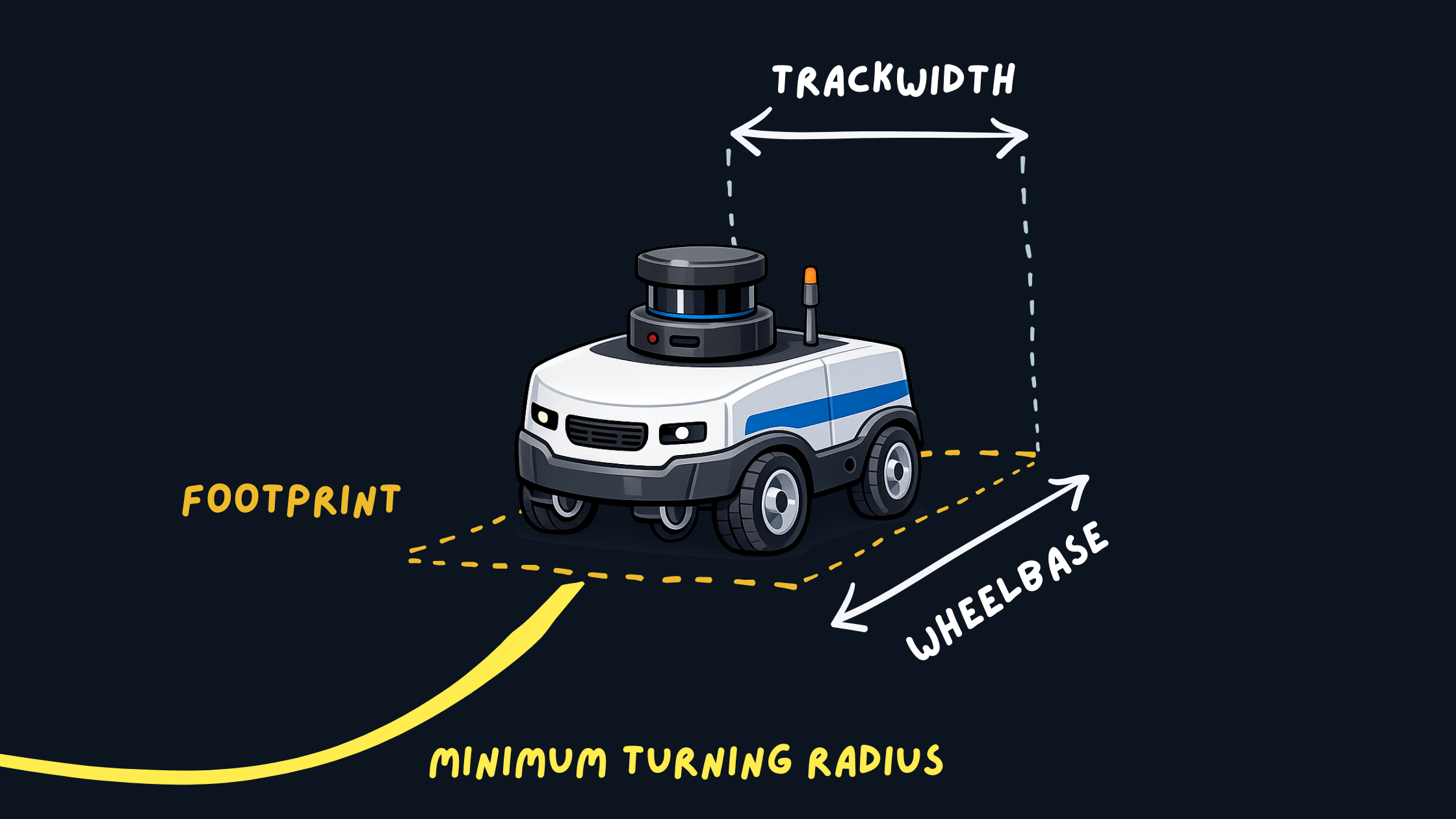
<h3 id="1-constant-parameters-robot-geometry">1. Constant Parameters (Robot Geometry)</h3>

<p>These represent the physical properties of the robot:</p>

<ul>
  <li>Footprint</li>
  <li>Wheelbase</li>
  <li>Minimum turning radius</li>
</ul>

<p><img src="/assets/images/posts/nav2-tuning/robot-footprint.png" alt="Robot Footprint and Geometry" />
<em>Robot Footprint and Geometry</em></p>

<p>These should match real-world measurements and <strong>should not be tuned for behavior</strong>.</p>

<p>Incorrect values can lead to:</p>
<ul>
  <li>Invalid or infeasible paths</li>
  <li>Collisions despite correct planning</li>
  <li>Controller instability</li>
</ul>

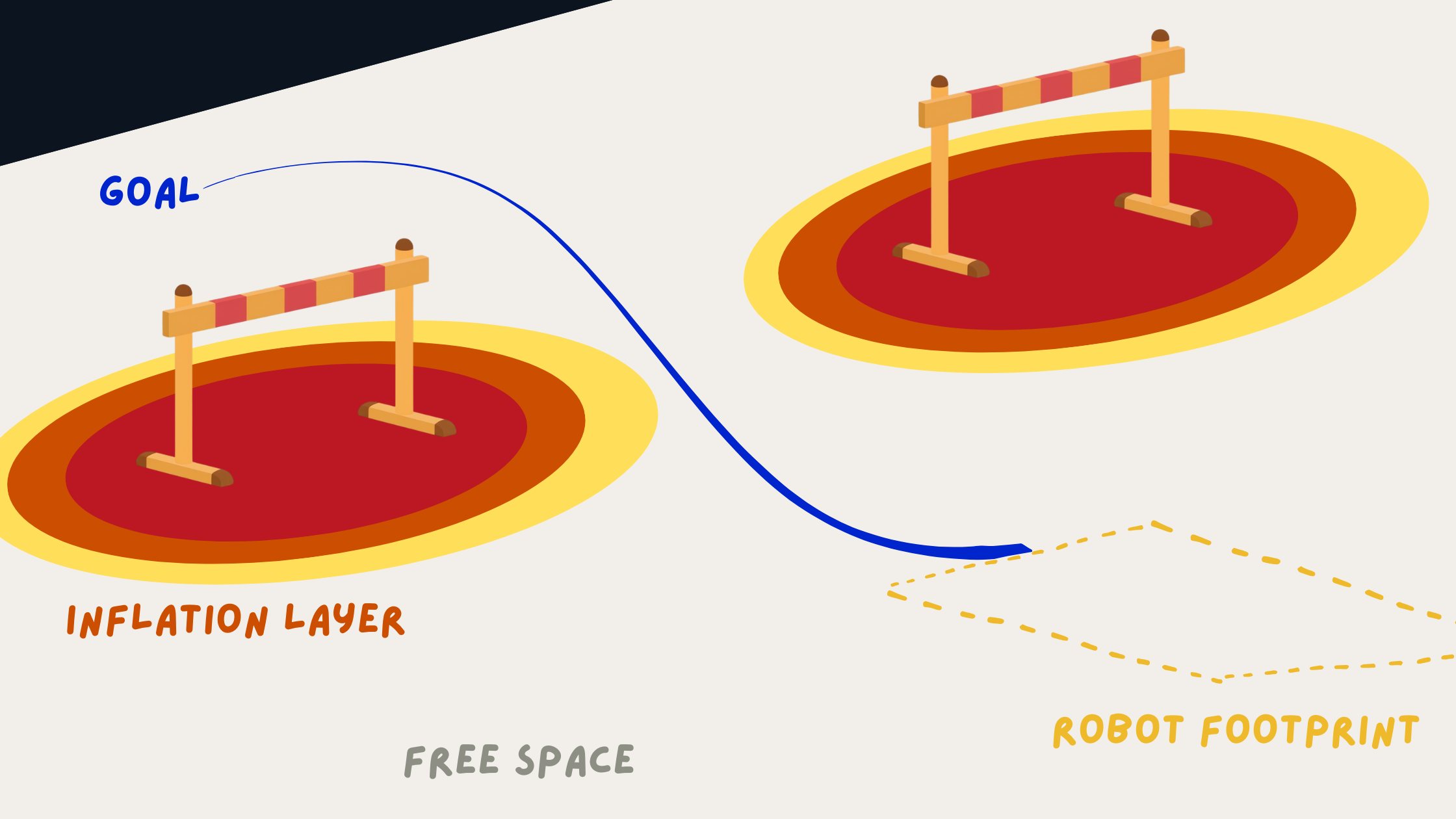
<h3 id="2-hard-parameters-environment-representation">2. Hard Parameters (Environment Representation)</h3>

<p>These define how the robot perceives obstacles:</p>

<ul>
  <li>Inflation radius</li>
  <li>Cost scaling factors</li>
  <li>Obstacle layers</li>
</ul>

<p><img src="/assets/images/posts/nav2-tuning/costmap-inflation.png" alt="Costmap Inflation Visualization" />
<em>Costmap and Inflation Visualization</em></p>

<p>They directly influence:</p>

<ul>
  <li>Clearance from obstacles</li>
  <li>Safety margins</li>
  <li>Path feasibility</li>
</ul>

<p>These parameters are typically tuned once per environment and remain relatively stable.</p>

<h3 id="3-soft-parameters-behavioral-tuning">3. Soft Parameters (Behavioral Tuning)</h3>

<p>These control navigation behavior:</p>

<ul>
  <li>MPPI critic weights, DWB parameter weights</li>
  <li>Velocity and acceleration preferences</li>
</ul>

<p><img src="/assets/images/posts/nav2-tuning/trajectory-smoothness.png" alt="Trajectory Smoothness Comparison" />
<em>Trajectory Smoothness Comparison</em></p>

<p>They affect:</p>

<ul>
  <li>Smoothness of motion</li>
  <li>Aggressiveness</li>
  <li>Oscillations and steering stability</li>
</ul>

<p>These are the primary parameters adjusted during iterative tuning.</p>

<p>This separation helps isolate problems and prevents conflicting tuning decisions across different parts of the system.</p>

<h2 id="the-missing-piece-benchmarks">The Missing Piece: Benchmarks</h2>

<p>One of the biggest gaps in Nav2 workflows is the lack of standardized benchmarks.</p>

<p>Instead of testing random navigation goals, define consistent scenarios:</p>

<div class="language-yaml highlighter-rouge"><div class="highlight"><pre class="highlight"><code><span class="na">benchmarks</span><span class="pi">:</span>
  <span class="pi">-</span> <span class="s">full_loop</span>
  <span class="pi">-</span> <span class="s">tight_corridor_uturn</span>
  <span class="pi">-</span> <span class="s">corner_escape</span>
  <span class="pi">-</span> <span class="s">reverse_reposition</span>
</code></pre></div></div>

<p>Each scenario evaluates a specific capability:</p>
<ul>
  <li>Tight space maneuvering</li>
  <li>Reverse behavior</li>
  <li>Long-distance navigation</li>
  <li>Stability in constrained environments</li>
</ul>

<h2 id="start-simple-progressive-benchmarking">Start Simple: Progressive Benchmarking</h2>

<p>A common mistake when tuning Nav2 is jumping directly into complex scenarios like tight corridors or full loops.</p>

<p>This makes debugging difficult since multiple components (planner, controller, costmaps) are stressed at once.</p>

<p>Instead, use <strong>progressive benchmarks</strong>, start simple, and then increase complexity.</p>

<h3 id="level-1-primitive-behaviors">Level 1: Primitive Behaviors</h3>

<div class="language-yaml highlighter-rouge"><div class="highlight"><pre class="highlight"><code><span class="na">benchmarks</span><span class="pi">:</span>
  <span class="pi">-</span> <span class="s">straight_line</span>
  <span class="pi">-</span> <span class="s">in_place_rotation</span>
  <span class="pi">-</span> <span class="s">gentle_turn</span>
</code></pre></div></div>

<p>These test basic control:</p>
<ul>
  <li>Straight motion stability</li>
  <li>Smooth rotation</li>
  <li>Steering oscillations</li>
</ul>

<p><img src="/assets/images/posts/nav2-tuning/straight-line-benchmark.gif" alt="Straight Line Benchmark" />
<em>Straight Line Benchmark Visualization</em></p>

<p>Issues here usually point to:</p>
<ul>
  <li>Controller critics and parameters</li>
  <li>Velocity limits</li>
</ul>

<h3 id="level-2-constrained-behaviors">Level 2: Constrained Behaviors</h3>

<div class="language-yaml highlighter-rouge"><div class="highlight"><pre class="highlight"><code><span class="na">benchmarks</span><span class="pi">:</span>
  <span class="pi">-</span> <span class="s">narrow_passage</span>
  <span class="pi">-</span> <span class="s">obstacle_avoidance</span>
</code></pre></div></div>

<p>These test interaction with the environment:</p>
<ul>
  <li>Obstacle clearance</li>
  <li>Costmap behavior</li>
</ul>

<p>Problems here are often related to:</p>
<ul>
  <li>Inflation radius</li>
  <li>Cost scaling</li>
</ul>

<h3 id="level-3-full-scenarios">Level 3: Full Scenarios</h3>

<div class="language-yaml highlighter-rouge"><div class="highlight"><pre class="highlight"><code><span class="na">benchmarks</span><span class="pi">:</span>
  <span class="pi">-</span> <span class="s">full_loop</span>
  <span class="pi">-</span> <span class="s">tight_corridor_uturn</span>
  <span class="pi">-</span> <span class="s">corner_escape</span>
</code></pre></div></div>

<p>These combine planning and control under realistic conditions.</p>

<p><img src="/assets/images/posts/nav2-tuning/full-environment-loop-benchmark.gif" alt="Full Environment Loop Benchmark" />
<em>Full Environment Loop Benchmark Visualization</em></p>
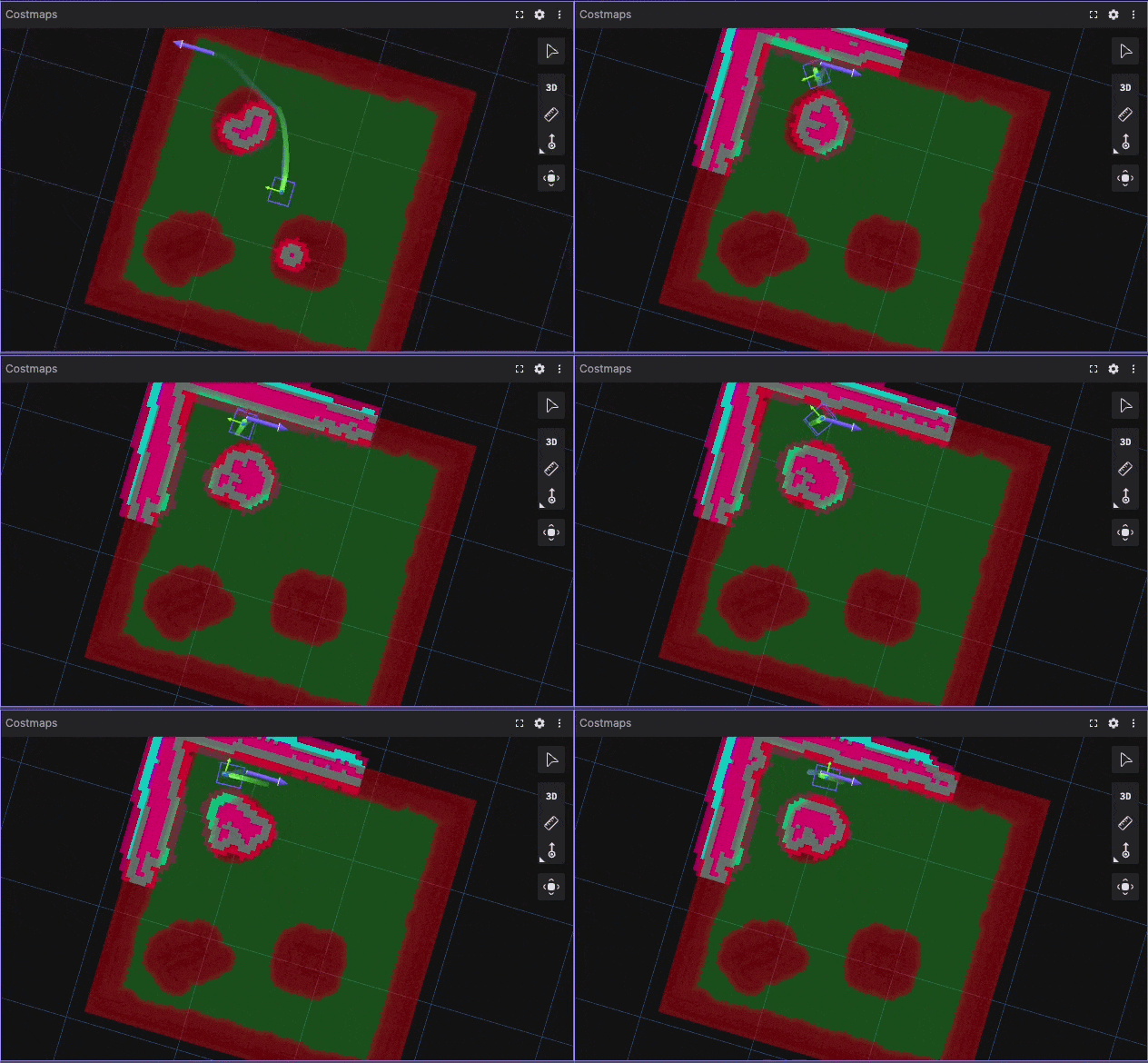
<h3 id="why-this-works">Why This Works</h3>
<ul>
  <li>Level 1 → Controller issues</li>
  <li>Level 2 → Costmap issues</li>
  <li>Level 3 → System-level issues</li>
</ul>

<p>This layered approach reduces trial-and-error and makes tuning more systematic by isolating issues at the correct level of the system.</p>

<h2 id="example-benchmark-results">Example Benchmark Results</h2>

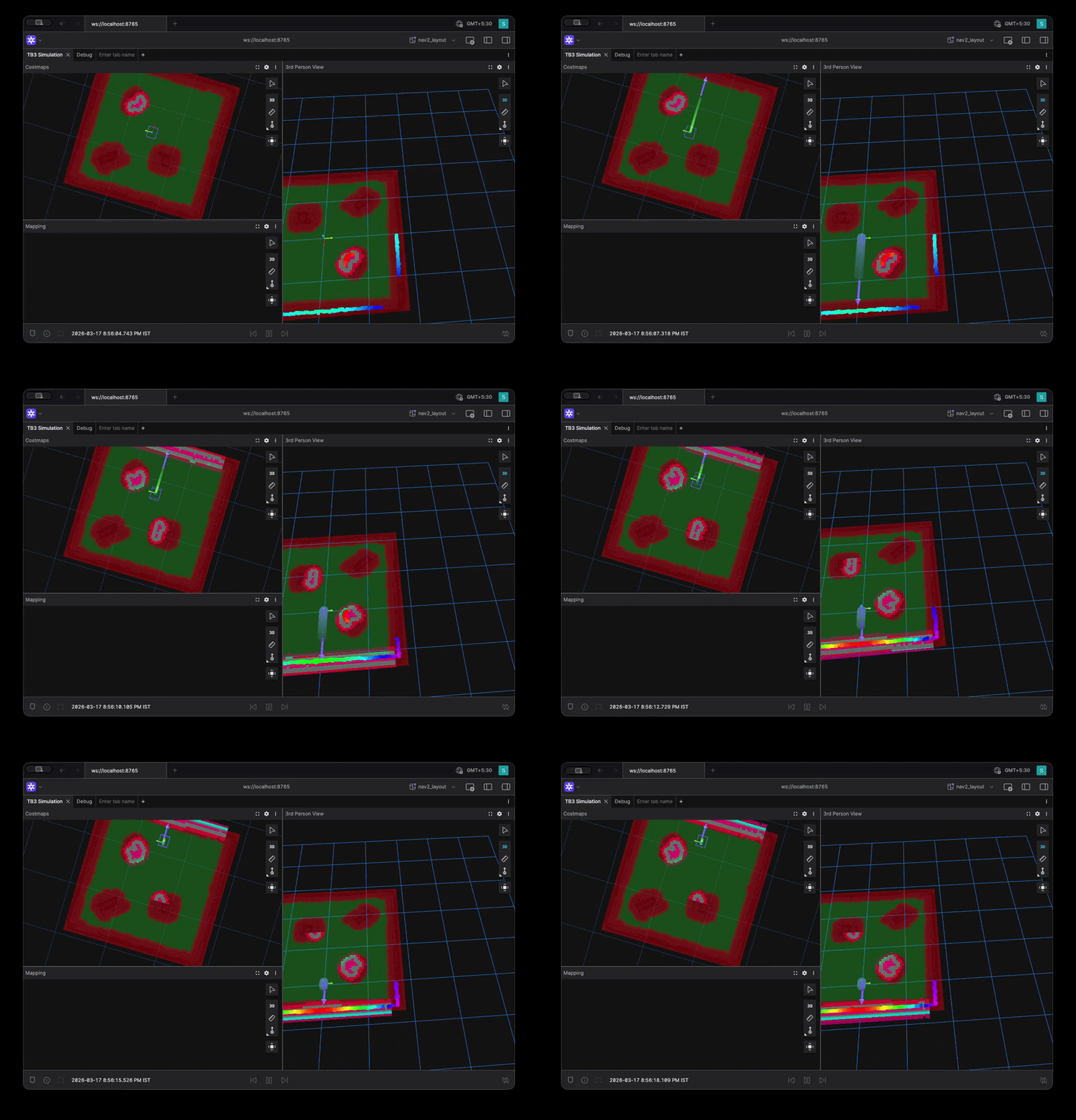
<p><img src="/assets/images/posts/nav2-tuning/tight-corridor-uturn-benchmark.gif" alt="Tight Corridor UTurn Benchmark" />
<em>Tight Corridor UTurn Benchmark Visualization</em></p>
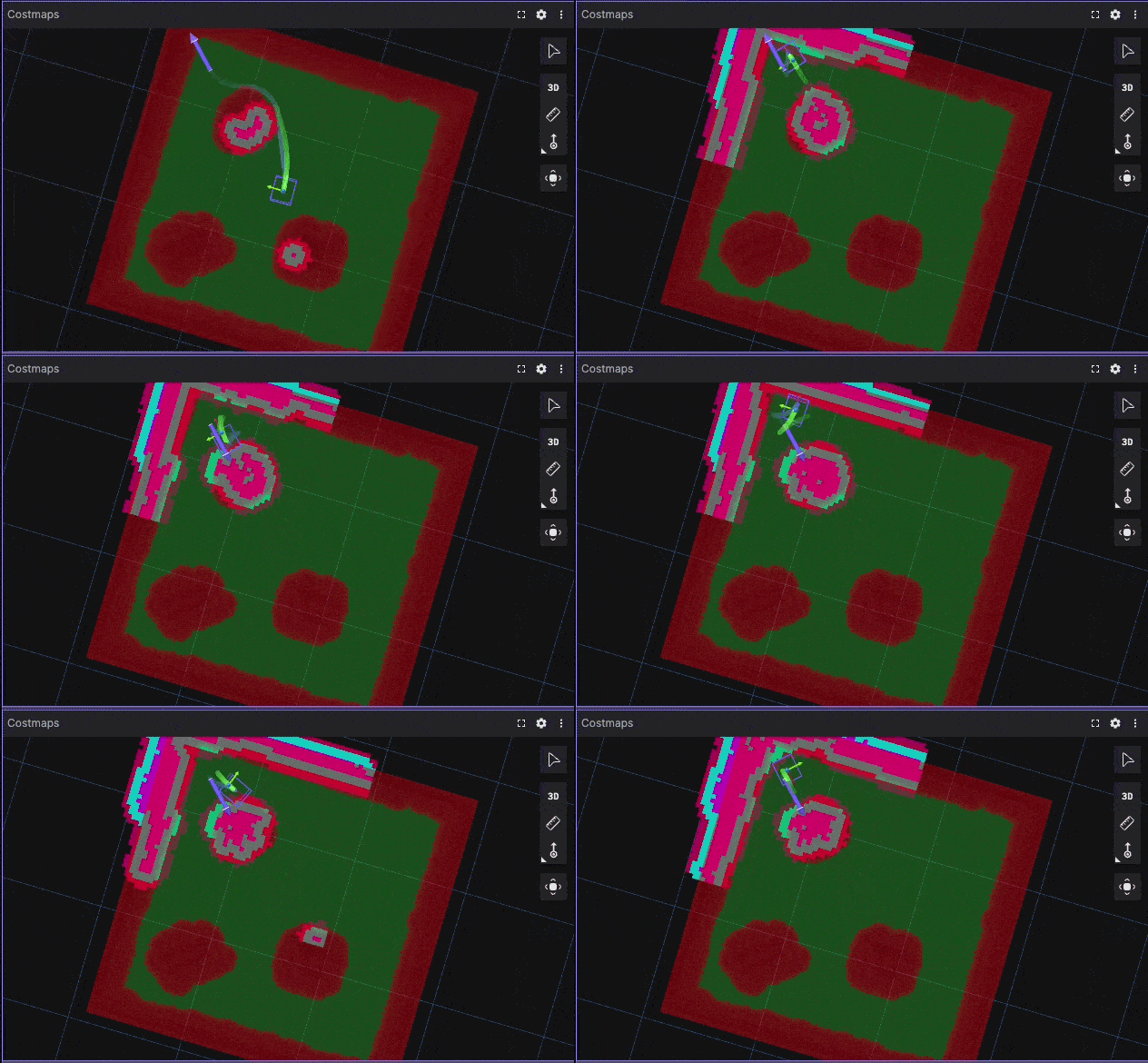
<p><img src="/assets/images/posts/nav2-tuning/corner-escape-benchmark.gif" alt="Corner Escape Benchmark" />
<em>Corner Escape Benchmark Visualization</em></p>

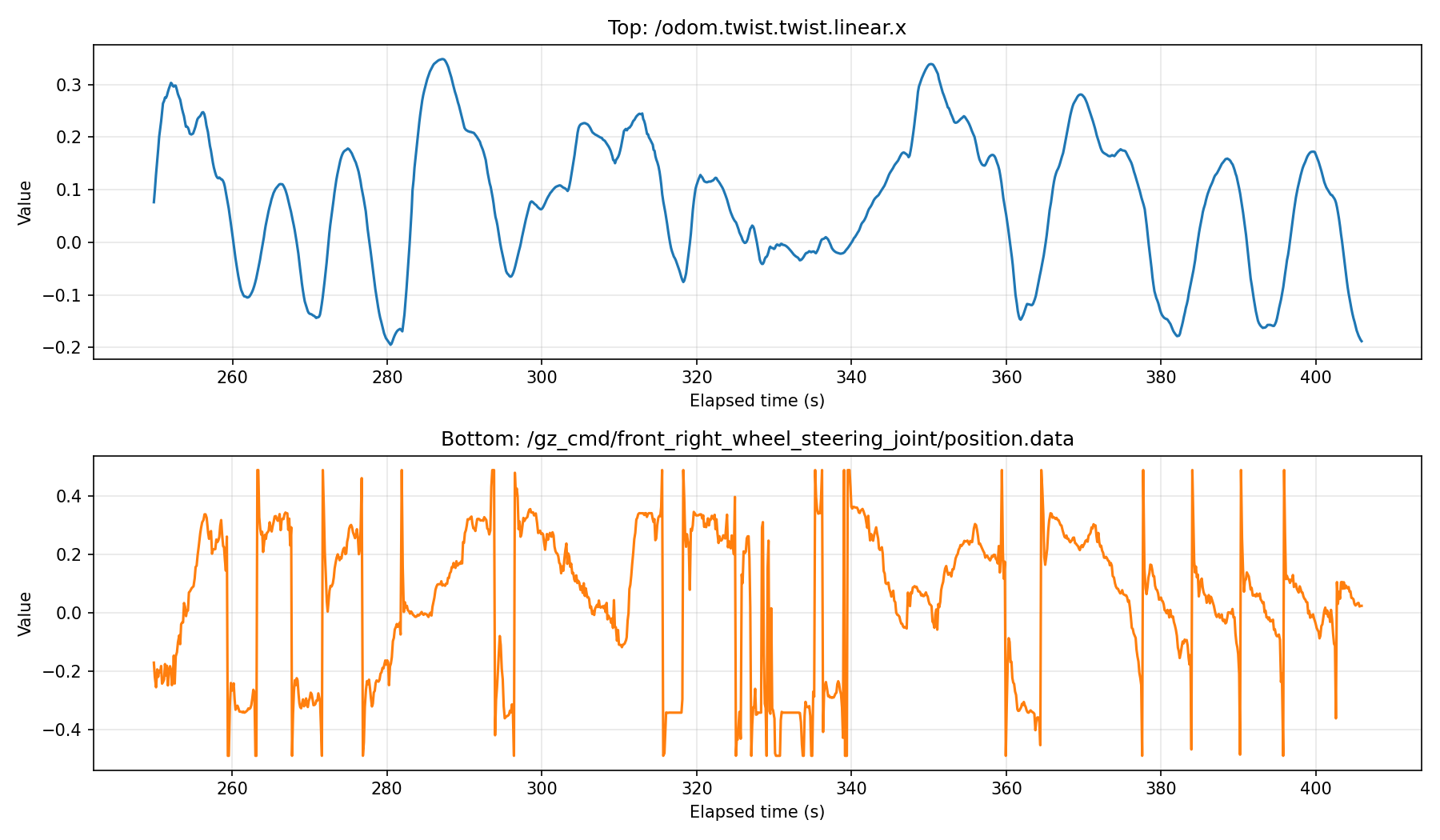
<p>Using Foxglove recordings allows clear visualization of trajectories, velocity profiles, and controller behavior.</p>

<p>Once benchmarks are defined, the next step is to make experiments reproducible.</p>

<h2 id="yaml-driven-experimentation">YAML-Driven Experimentation</h2>

<p>Instead of modifying a single configuration repeatedly, define experiments explicitly:</p>

<div class="language-yaml highlighter-rouge"><div class="highlight"><pre class="highlight"><code><span class="na">experiment</span><span class="pi">:</span>
  <span class="na">name</span><span class="pi">:</span> <span class="s2">"</span><span class="s">high_clearance_smooth"</span>

<span class="na">nav2</span><span class="pi">:</span>
  <span class="na">inflation_radius</span><span class="pi">:</span> <span class="m">0.7</span>
  <span class="na">mppi</span><span class="pi">:</span>
    <span class="na">temperature</span><span class="pi">:</span> <span class="m">0.3</span>
    <span class="na">critic_weights</span><span class="pi">:</span>
      <span class="na">path_follow</span><span class="pi">:</span> <span class="m">5.0</span>
</code></pre></div></div>

<p>A simple runner script can execute:</p>
<div class="language-bash highlighter-rouge"><div class="highlight"><pre class="highlight"><code>run_experiment exp.yaml
</code></pre></div></div>

<p>This enables:</p>
<ul>
  <li>Reproducible experiments</li>
  <li>Easy comparison between configurations</li>
  <li>Structured iteration</li>
</ul>

<h2 id="quantitative-evaluation-metrics">Quantitative Evaluation Metrics</h2>

<p>Relying only on visual inspection is insufficient.</p>

<p>Useful metrics for evaluating Nav2 performance include:</p>
<ul>
  <li>Time to goal</li>
  <li>Path length</li>
  <li>Minimum obstacle distance</li>
  <li>Velocity or steering smoothness</li>
  <li>Number of oscillations</li>
</ul>

<h3 id="example-comparison">Example Comparison</h3>

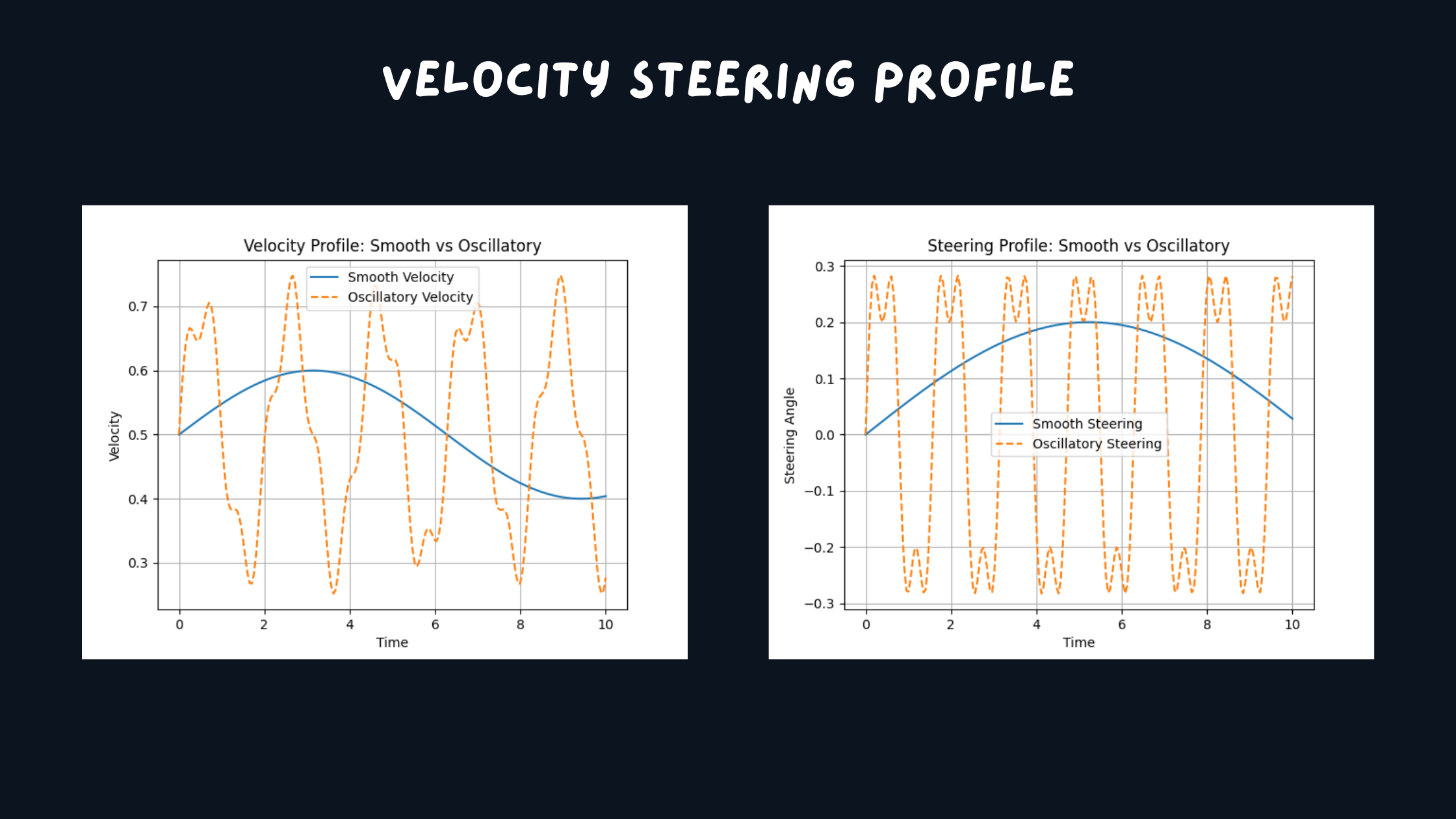
<p><img src="/assets/images/posts/nav2-tuning/logged-metrics.png" alt="Logged Metrics" />
<em>Logged Steering and Velocity Signals</em></p>

<p>Even simple logging of these metrics significantly improves decision-making during tuning.</p>

<h3 id="key-observations">Key Observations</h3>

<p>From applying this structured approach:</p>

<h4 id="1-many-issues-originate-from-incorrect-modeling">1. Many issues originate from incorrect modeling</h4>

<p>Incorrect footprint or costmap configuration often leads to poor navigation performance.</p>

<h4 id="2-benchmark-driven-tuning-is-more-reliable">2. Benchmark-driven tuning is more reliable</h4>

<p>Fixed scenarios make it possible to compare configurations objectively.</p>

<h4 id="3-parameter-grouping-simplifies-tuning">3. Parameter grouping simplifies tuning</h4>

<p>Separating constant, hard, and soft parameters reduces complexity.</p>

<h4 id="4-automation-is-not-the-first-step">4. Automation is not the first step</h4>

<p>Automated tuning tools are useful only after:</p>
<ul>
  <li>Benchmarks are defined</li>
  <li>Metrics are established</li>
  <li>System behavior is understood</li>
</ul>

<h2 id="toward-a-better-nav2-workflow">Toward a Better Nav2 Workflow</h2>

<p>A structured navigation tuning workflow can be organized as:</p>

<div class="language-plaintext highlighter-rouge"><div class="highlight"><pre class="highlight"><code>nav2_benchmark/
├── scenarios/
├── configs/
├── runner/
├── metrics/
└── results/
</code></pre></div></div>

<p>Such a framework enables:</p>
<ul>
  <li>Reproducible experiments</li>
  <li>Quantitative evaluation</li>
  <li>Scalable tuning workflows</li>
</ul>

<h2 id="conclusion">Conclusion</h2>

<p>Nav2 tuning is often framed as a parameter optimization problem.</p>

<p>In practice, it is a systems engineering problem involving:</p>
<ul>
  <li>Accurate robot modeling</li>
  <li>Consistent environment representation</li>
  <li>Structured benchmarks</li>
  <li>Quantitative evaluation</li>
</ul>

<p>Automation can help, but it is not the solution.</p>

<p>A structured approach based on experiments, metrics, and system-level understanding leads to more reliable and scalable navigation performance.</p>

<h2 id="discussion">Discussion</h2>
<ul>
  <li>How do you currently tune Nav2?</li>
  <li>Do you rely on visual inspection or quantitative metrics?</li>
  <li>Would a standardized benchmarking framework improve your workflow?</li>
</ul>]]></content><author><name>Sakshay Mahna</name></author><category term="Robotics" /><category term="Navigation" /><category term="System Architecture" /><category term="ROS2" /><category term="Nav2" /><category term="MPPI" /><category term="SMAC Hybrid A*" /><category term="Autonomous Navigation" /><category term="Robotics Engineering" /><category term="Ackermann Steering" /><category term="Path Planning" /><category term="Robot Control" /><summary type="html"><![CDATA[Why Nav2 tuning is a systems problem, not an automation problem — and how structured benchmarks, YAML-driven experiments, and parameter design improve navigation performance.]]></summary></entry><entry><title type="html">Designing a Scalable AMR + Manipulator Architecture</title><link href="https://kodorobotics.com/amr-manipulator-architecture/" rel="alternate" type="text/html" title="Designing a Scalable AMR + Manipulator Architecture" /><published>2026-02-16T00:00:00+00:00</published><updated>2026-02-16T00:00:00+00:00</updated><id>https://kodorobotics.com/amr-manipulator-system-architecture</id><content type="html" xml:base="https://kodorobotics.com/amr-manipulator-architecture/"><![CDATA[<h2 id="introduction">Introduction</h2>

<p>Autonomous Mobile Robots (AMRs) combined with robotic arms are becoming common in warehouses and factories. They move through aisles, dock at shelves, pick objects, and deliver them to new locations.</p>

<p>But building such a system is not just about writing code. It is about designing the right architecture: one that allows navigation, perception, manipulation, and control to work together reliably.</p>

<p>In this article, we break down how to design a scalable AMR + Manipulator system and how to choose the right frameworks for each layer.</p>

<h2 id="problem-definition">Problem Definition</h2>

<p>Imagine a warehouse workflow:</p>

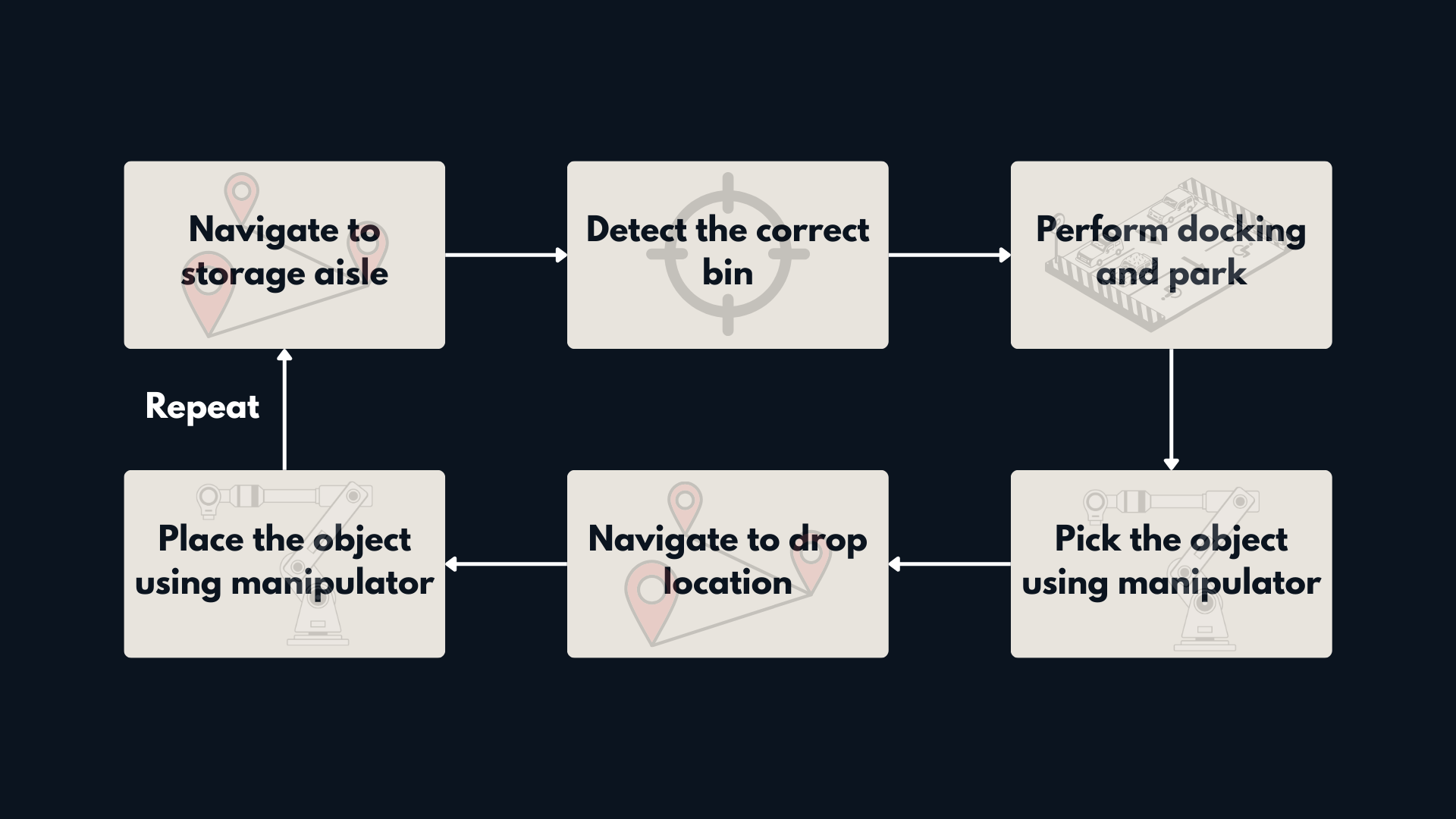
<p><img src="/assets/images/posts/amr-manipulator-system-architecture/problem-definition.png" alt="Warehouse Mobile Manipulation Workflow" />
<em>Figure 1: Problem definition for Warehouse Mobile Manipulation Workflow.</em></p>
<ol>
  <li>Navigate to a storage aisle</li>
  <li>Identify the correct bin</li>
  <li>Dock precisely in front of it</li>
  <li>Pick the object using a 6-DOF arm</li>
  <li>Deliver it to a drop-off station</li>
  <li>Repeat safely and consistently</li>
</ol>

<p>To build this reliably, we need structured system design.</p>

<h2 id="layered-system-architecture">Layered System Architecture</h2>

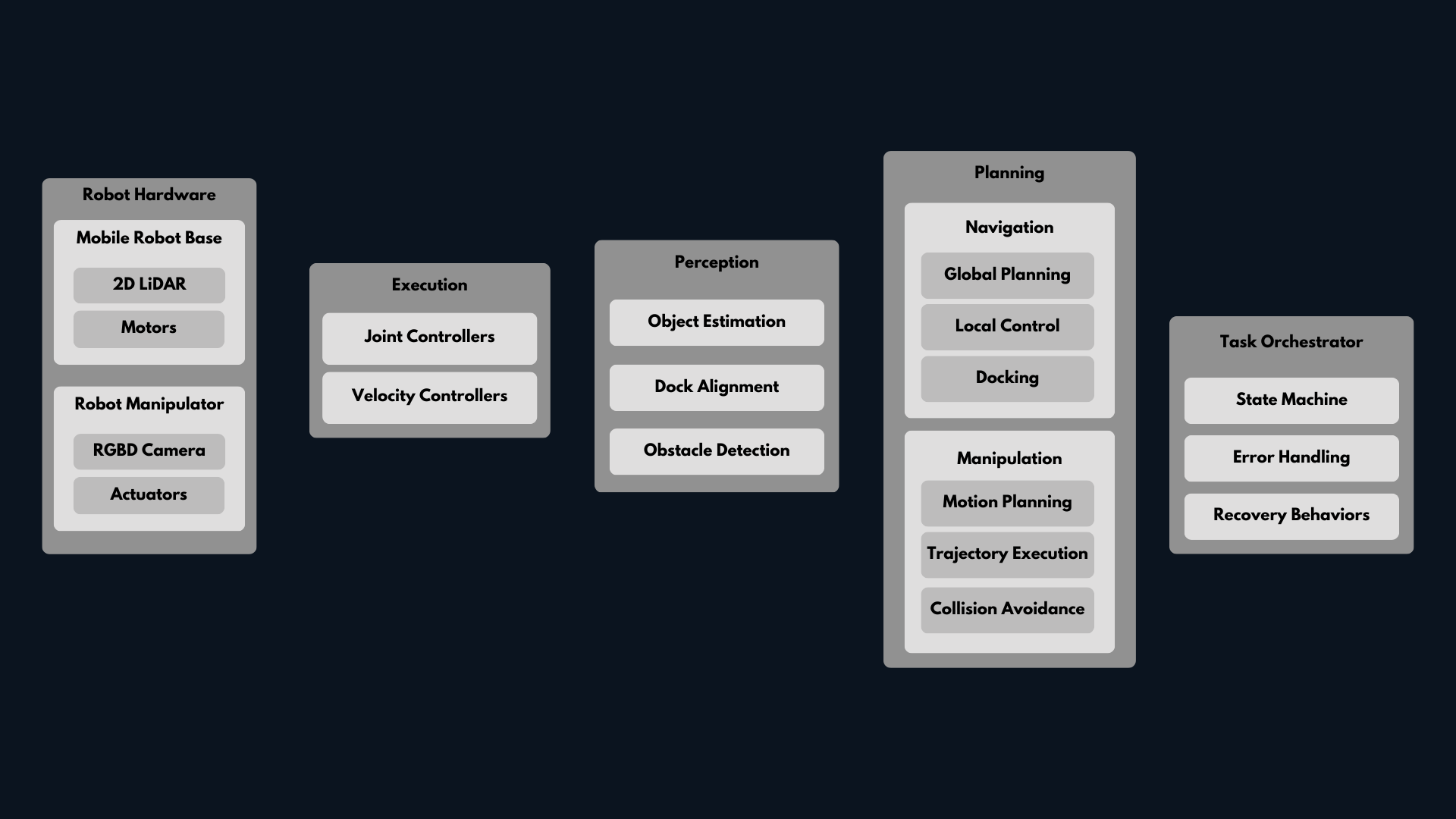
<p><img src="/assets/images/posts/amr-manipulator-system-architecture/amr-architecture.png" alt="Layered AMR Manipulator Architecture" />
<em>Figure 2: Layered architecture for a scalable AMR + manipulator system.</em></p>
<p>A scalable mobile manipulation system can be divided into clear layers:</p>

<h3 id="1-hardware-layer">1. Hardware Layer</h3>
<ul>
  <li>Mobile base</li>
  <li>LiDAR and RGB-D camera</li>
  <li>6-DOF robotic arm</li>
  <li>Gripper</li>
</ul>

<h3 id="2-perception-layer">2. Perception Layer</h3>
<ul>
  <li>Object detection</li>
  <li>Dock alignment</li>
  <li>Obstacle detection</li>
</ul>

<h3 id="3-planning-layer">3. Planning Layer</h3>
<p><strong>Navigation</strong></p>
<ul>
  <li>Global path planning</li>
  <li>Local obstacle avoidance</li>
  <li>Docking behavior</li>
</ul>

<p><strong>Manipulation</strong></p>
<ul>
  <li>Motion planning</li>
  <li>Collision checking</li>
  <li>Trajectory execution</li>
</ul>

<h3 id="4-execution-layer">4. Execution Layer</h3>
<ul>
  <li>Joint controllers</li>
  <li>Base velocity controllers</li>
</ul>

<h3 id="5-task-orchestration">5. Task Orchestration</h3>
<ul>
  <li>State machine or Behavior Tree</li>
  <li>Error handling</li>
  <li>Recovery behaviors</li>
</ul>

<p>This separation keeps the system modular. Each layer can be developed, tested, and improved independently.</p>

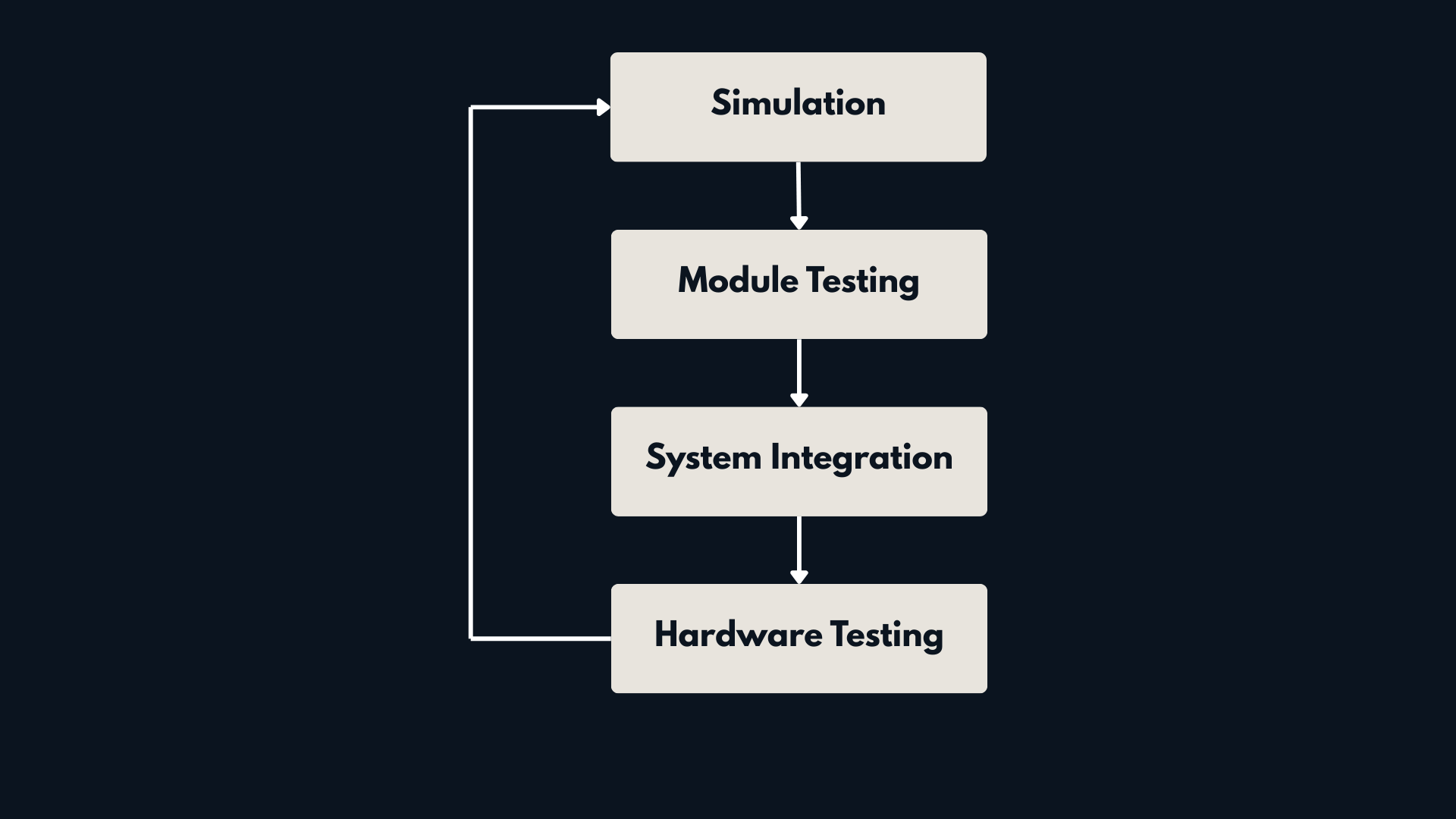
<h2 id="design-philosophy-simulation-first-then-integration">Design Philosophy: Simulation First, Then Integration</h2>

<p>Architecture alone is not enough. The development process matters just as much.</p>

<p>At Kodo Robotics, we follow a simple rule:</p>

<p><strong>Simulate first. Integrate gradually. Deploy last.</strong></p>

<h3 id="simulation-first">Simulation First</h3>

<p>Before touching hardware, we validate everything in simulation:</p>

<ul>
  <li>Navigation tuning in warehouse layouts</li>
  <li>Arm motion planning in clutter</li>
  <li>Docking precision</li>
  <li>Sensor behavior under different conditions</li>
</ul>

<p>Simulation allows fast iteration, safe testing, and reproducible experiments.</p>

<p><img src="/assets/images/posts/amr-manipulator-system-architecture/development-loop.png" alt="Development Workflow Loop" />
<em>Figure 3: Development Loop for a scalable robotics system.</em></p>

<h3 id="test-modules-independently">Test Modules Independently</h3>

<p>Each layer is tested separately before full integration:</p>

<p><strong>Navigation</strong></p>
<ul>
  <li>Path planning stability</li>
  <li>Obstacle avoidance</li>
</ul>

<p><strong>Manipulation</strong></p>
<ul>
  <li>IK validation</li>
  <li>Collision-free trajectories</li>
</ul>

<p><strong>Perception</strong></p>
<ul>
  <li>Object detection accuracy</li>
  <li>Pose estimation consistency</li>
</ul>

<p>This prevents integration problems later.</p>

<h3 id="incremental-integration">Incremental Integration</h3>

<p>Instead of integrating everything at once, we proceed step by step:</p>

<ol>
  <li>Base + navigation</li>
  <li>Arm motion planning</li>
  <li>Docking integration</li>
  <li>Full pick and place loop</li>
  <li>Fault and recovery testing</li>
</ol>

<p>Only after simulation and integration tests are stable do we move to hardware validation.</p>

<h3 id="hardware-testing">Hardware Testing</h3>

<p>Real-world testing focuses on:</p>

<ul>
  <li>Sensor latency</li>
  <li>Mechanical tolerances</li>
  <li>Calibration drift</li>
  <li>Real-world noise</li>
</ul>

<p>Simulation builds confidence. Hardware testing validates assumptions.</p>

<h2 id="framework-comparison-by-architecture-layer">Framework Comparison by Architecture Layer</h2>

<p>Framework selection should support the layered architecture — not fight it.</p>

<table>
  <thead>
    <tr>
      <th>Layer</th>
      <th>ROS2 Ecosystem</th>
      <th>NVIDIA Isaac</th>
      <th>MATLAB/Simulink</th>
    </tr>
  </thead>
  <tbody>
    <tr>
      <td>Navigation</td>
      <td>Nav2</td>
      <td>Isaac ROS Navigation</td>
      <td>Navigation Toolbox</td>
    </tr>
    <tr>
      <td>Manipulation</td>
      <td>MoveIt2</td>
      <td>Isaac Manipulation</td>
      <td>Robotics System Toolbox</td>
    </tr>
    <tr>
      <td>Simulation</td>
      <td>Gazebo</td>
      <td>Isaac Sim</td>
      <td>Simulink + Unreal</td>
    </tr>
    <tr>
      <td>Control</td>
      <td>ros2_control</td>
      <td>GPU nodes</td>
      <td>Model-based control</td>
    </tr>
    <tr>
      <td>Deployment</td>
      <td>Linux / RT</td>
      <td>GPU platforms</td>
      <td>Autocode + ROS integration</td>
    </tr>
  </tbody>
</table>

<p>Now let’s look at each layer clearly.</p>

<h3 id="navigation">Navigation</h3>

<p>For warehouse AMRs, <strong>Nav2</strong> is currently the most practical choice.</p>

<p>It provides:</p>
<ul>
  <li>Mature planners</li>
  <li>Behavior Tree orchestration</li>
  <li>Recovery behaviors</li>
  <li>Costmaps and zoning</li>
  <li>Docking support</li>
</ul>

<p>It is modular and widely adopted.</p>

<p>Isaac offers acceleration and perception-focused advantages, but Nav2 provides stronger out-of-the-box industrial navigation features.</p>

<p>MATLAB can prototype planners but does not provide a complete industrial navigation stack by default.</p>

<p><strong>Practical choice:</strong> Nav2 for most industrial AMR systems.</p>

<h3 id="manipulation">Manipulation</h3>

<p>For arm motion planning, <strong>MoveIt2</strong> remains the most flexible and integration-friendly option.</p>

<p>It offers:</p>
<ul>
  <li>Collision checking</li>
  <li>OMPL-based motion planning</li>
  <li>Inverse kinematics (IK) solvers</li>
  <li>Planning scene management</li>
  <li>Pick-and-place framework with grasp execution support</li>
  <li>Integration with ros2_control for hardware execution</li>
</ul>

<p>Isaac provides strong GPU-based workflows, especially for perception heavy pipelines.</p>

<p>MATLAB/Simulink is excellent for prototyping kinematics and trajectory logic, but typically integrates with ROS for execution.</p>

<p><strong>Practical choice:</strong> MoveIt2 as the backbone, optionally supported by MATLAB for algorithm design.</p>

<h3 id="simulation">Simulation</h3>

<p>If you follow a simulation-first philosophy, simulator choice matters.</p>

<p><strong>Gazebo</strong></p>
<ul>
  <li>Fast iteration</li>
  <li>Tight ROS2 integration</li>
  <li>Ideal for functional validation</li>
</ul>

<p><strong>Isaac Sim</strong></p>
<ul>
  <li>High visual fidelity</li>
  <li>Advanced sensor realism</li>
  <li>Strong for perception systems</li>
</ul>

<p><strong>Simulink + Unreal</strong></p>
<ul>
  <li>Control focused validation</li>
  <li>Physics based modeling</li>
</ul>

<p>Choose based on what you are validating:</p>
<ul>
  <li>System logic → Gazebo</li>
  <li>Sensor realism → Isaac</li>
  <li>Control validation → Simulink</li>
</ul>

<h3 id="control-design">Control Design</h3>

<p>For many industrial systems, <code class="language-plaintext highlighter-rouge">ros2_control</code> is sufficient.</p>

<p>However, when:</p>
<ul>
  <li>Advanced model-based control is required</li>
  <li>Safety validation is important</li>
  <li>Autocode generation is needed</li>
</ul>

<p>MATLAB/Simulink provides strong structured workflows.</p>

<p>Isaac mainly accelerates compute-heavy tasks rather than replacing control design frameworks.</p>

<h3 id="deployment">Deployment</h3>

<p>Deployment depends on system constraints.</p>

<p><strong>ROS2</strong></p>
<ul>
  <li>Modular</li>
  <li>Linux native</li>
  <li>Hardware abstraction friendly</li>
</ul>

<p><strong>Isaac</strong></p>
<ul>
  <li>GPU optimized deployment</li>
</ul>

<p><strong>MATLAB/Simulink</strong></p>
<ul>
  <li>Automatic C++ generation</li>
  <li>Clear traceability from design to runtime</li>
</ul>

<p>For model-based workflows, MATLAB shines during deployment integration.</p>

<h2 id="recommended-hybrid-approach">Recommended Hybrid Approach</h2>

<p>A layered architecture allows mixing tools intelligently:</p>

<ul>
  <li>Navigation → Nav2</li>
  <li>Manipulation → MoveIt2</li>
  <li>Simulation → Gazebo or Isaac Sim</li>
  <li>Control validation → MATLAB/Simulink</li>
  <li>Runtime deployment → ROS2</li>
</ul>

<p>The goal is not to choose one ecosystem, but to design a clean, modular system.</p>

<h2 id="conclusion">Conclusion</h2>

<p>Building an AMR + Manipulator system is an architecture challenge.</p>

<p>Clear layering, disciplined testing, and simulation-first development are what make systems scalable and reliable.</p>

<p>At Kodo Robotics, we focus on structured system design, because in robotics, integration quality determines success.</p>

<h2 id="lets-build-reliable-robotics-systems">Let’s Build Reliable Robotics Systems</h2>

<p>If you are designing a warehouse automation system or exploring mobile manipulation for industrial use, architecture decisions made early will define long-term success.</p>

<p>Whether you are prototyping a new platform or scaling an existing deployment, a modular, simulation-first approach reduces risk and accelerates development.</p>

<p>Feel free to connect or reach out if you would like to discuss system architecture, mobile manipulation, or AMR platform design.</p>]]></content><author><name>Sakshay Mahna</name></author><category term="Robotics" /><category term="System Architecture" /><category term="AMR" /><category term="Mobile Manipulation" /><category term="Warehouse Automation" /><category term="ROS2" /><category term="MoveIt2" /><category term="Nav2" /><category term="MATLAB" /><category term="Simulink" /><summary type="html"><![CDATA[A practical guide to designing a scalable AMR + robotic arm architecture for warehouse automation, covering ROS2, MoveIt2, Nav2, MATLAB, and simulation-first development.]]></summary></entry></feed>